Make sure that the page which you want to use for your Feature Box already exists in WordPress; if it doesn’t, then create and publish it now.
Note: Be sure to set a Featured Image when creating your page, as the Feature Box reserves space on the right to display one!
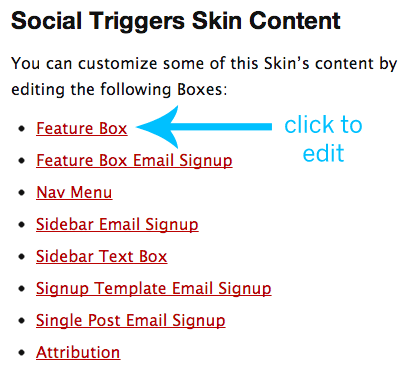
Then, visit your Skin Content page (Thesis Admin → Skin → Content), and click the Feature Box link underneath the “Social Triggers Skin Content” heading, as shown in the image below:
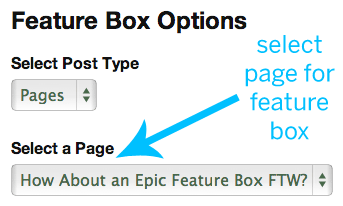
In the second dropdown box on the resulting page (pictured at right), select a WordPress page that you’d like to use for your feature box content.
After selecting your feature box content page, hit the green “Save Options” button, and you’re done!