Ancient Chinese proverb: it should never be your code that changes, only your design! And that’s only one reason why you need Thesis.

Introducing Thesis 1.3, the Ultimate HTML Framework

by Chris Pearson on October 22, 2008

Thesis 1.3 has arrived, and in addition to a lot of minor tweaks and improvements, this new version contains two mission-critical features that beg for further explanation.
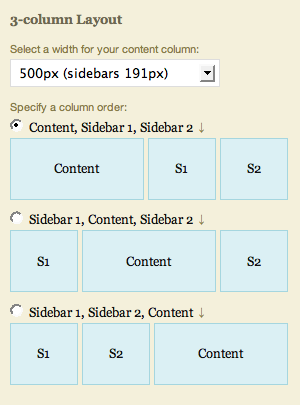
choose your columnar arrangement

You can now choose your column order in the Thesis layout constructor.

First, Thesis now boasts a completely modularized HTML markup structure, and this makes the theme much more agile and flexible than it was before. As a result, Thesis now has the ability to render more layouts than ever, including a 3-column layout where the content is in the middle. In all, there are 6 different columnar arrangement possibilities between the 1, 2, and 3 column layouts.

On top of this, Thesis also sports a new HTML framework selector that allows you to change the underlying HTML structure without affecting any other elements of the theme. I realize this is pretty technical, but hopefully, I can communicate the primary benefit of this new, chameleon-like HTML framework by way of example.
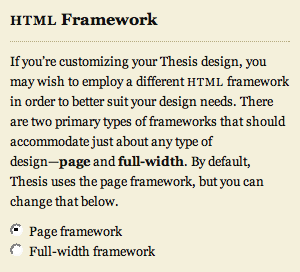
HTML framework selector

The new HTML framework selector.

Last week on Pearsonified, I announced that I customized the Tip’d Blog by using the Thesis framework. Prior versions of Thesis would not have been able to accommodate a full-width design like this one (note how the background colors of the header and footer extend all the way to the edges of your browser). However, by choosing to use the new full-width HTML framework that is available in the Design Options panel, I was able to employ a markup structure better suited to accommodate the Tip’d design.

This is significant because in Web design, there are a couple of core HTML structures that can be used as the basis for just about any type of design. Therefore, if you want to radically alter your design in the future, you won’t need to go and get a new theme. Instead, you’ll just change Thesis’ HTML framework, and you’ll be able to customize your site’s design however you see fit.

In other words, Thesis is now flexible enough to accommodate any design, so the idea here is that you never have to change – or even worry about – your site’s core code ever again.

The second key improvement to Thesis 1.3 is the maturation of the hook system that was introduced in version 1.2. For those of you not already in the know, hooks are the single most important piece of the customization puzzle, simply because they allow you to make forward-compatible changes to your theme without touching any of the core code.

Thesis now contains 31 different hooks that you can use to add and subtract content all over the theme (think ads, design embellishments, plugin compatibility, etc). Given the far-reaching implications of a robust hook system, we at DIYthemes are going to be focusing more and more on educating you how to use these hooks effectively, so expect to see more content addressing this topic in the days to come.

Until then, go download Thesis 1.3, and unleash your site with the most advanced HTML publishing tool ever!

{ 6 trackbacks }

Dancing Monkey Mania » Blog Archive » links for 2008-10-24
10.24.08 at 12:00 am
Linklog: 2008-10-24 : Ruminate
10.24.08 at 4:58 am
Thesis full-width headers 101 — kristarella.com
11.14.08 at 4:47 am
links for 2008-11-14 « Rob Edwards: Collection of my daily bookmarks: roedward
11.14.08 at 10:58 pm
Looking to Design Your Own Site? Thesis Theme For Wordpress : Surviving the Blogosphere
12.19.08 at 5:52 am
Top Story
12.22.08 at 2:49 pm

{ 34 comments… read them below or add one }

Matej 10.22.08 at 4:50 pm

Any live demos, to actually see these changes? ….. if someone is interested to buy it ….

Lisa Firke 10.22.08 at 4:50 pm

Oh, Chris, this sounds terrific! Terrific enough to bother porting client sites to the new versions — terrific enough to port my home blog to the new version.

And that other client blog I’m working on right now and thought I might just skin it on top of Kubrick? That’s going to be a Thesis baby, too.

Can you tell I’m excited?

ruigato 10.22.08 at 5:05 pm

and what about a migration/update path? i just finished updating the 1.2 version before i saw this release..

Fausto Ponce 10.22.08 at 5:12 pm

It’s amazing, Chris! Also, I’m very exciting about the hooks, but I still can’t use them properly…

Keep the good work!

Stijn 10.22.08 at 5:13 pm

Great, now I’m going to have to make sure all my customisation are carried over to this new version. ;-)

kristarella 10.22.08 at 6:16 pm

Wow. Great work Chris.

I’ve been planning to port my design over to Thesis. I didn’t foresee any serious problems regarding header and footer, but you have made it that bit easier now with the full width!

I really look forward to exploring this version (stop distracting me from writing my uni thesis!).

Birdfreak 10.22.08 at 6:24 pm

Definitely looking forward to learning more about hooks. So far I have been able to figure out everything just fine.

correza 10.22.08 at 7:57 pm

Chris I am encountering an error in ‘archives.php’ the sidebar function seems to be undefined

Fatal error: Call to undefined function thesis_get_sidebars() in /wp-content/themes/thesis/archives.php on line 31

kristarella 10.22.08 at 8:12 pm

correza, you should ask about it in the forum. When I go to your archive page the sidebar is fine, but the header is not there, which is causing bigger problems.

kristarella 10.22.08 at 8:16 pm

Sorry corezza, I have the same problem with the archives. It’s still a question for the forum though.

eDragonu 10.22.08 at 11:51 pm

Looks impressive. I like the current focus of the developers and I am really satisfied with what I have so far. I already downloaded but I’ll give it two-three more days to install.

Keep up the good work :-)

Satish Talim 10.23.08 at 12:21 am

I successfully installed 1.3. There are two minor issues which I have posted on the relevant forum.

Kate 10.23.08 at 7:08 am

Hi there, I am really interested in buying your theme but I had a question. I have a personal blog which is split into 5 main sections. The way I have set it up uses 6 installations of Wordpress (one on the root and then one for each section /journal etc). Notwithstanding the insanity of this setup (I am sure there must be a better way but I can’t work it out with my limited knowledge), since I would need to install the theme 6 times, would I have to buy the developer option?

eDragonu 10.23.08 at 7:53 am

Ok, just couldn’t waited anymore and installed thesis 1.3 a couple of minutes ago. The sidebars files are gone and the customization is made only through widgets or hooks, but that’s ok, I can cope with that. Looks very nice :-)

@Kate: have you thought of wordpress mu? It seems that your type of blogging approach can be done with wordpress mu and chances are that you can use only one theme for all the 5 blogs. I’m not sure though. But I’m pretty sure that in the situation of having 5 wordpress instances you should by the developer version. At least I did, and I use it across several blogs without any problem. Good luck!

Roon 10.23.08 at 10:42 am

Cool theme, very well structured, like it loads!

Amit Verma 10.23.08 at 12:05 pm

Great features!
I have notice a few differences between thesis demo and the actual theme. especially in Nav bar tab size and sidebar headings.
There are lines above and below the sidebar headings in thesis demo which is not in actual theme.
If I need to make some changes in CSS how do I do them so that the changes will stay future proof (with the future updates)?

Jake Summers 10.23.08 at 1:55 pm

Chris,

I really don’t see how any other wordpress premium theme designers can compete with you. I have been following your work since you started thesis as well as the other top wp theme designers, and the work you are doing is really 1,000 steps ahead of them.

I cannot wait until the cosmos framework!

Bill Stevens 10.23.08 at 5:59 pm

I’m spending more time in the forum and I’m starting to see some light bulbs. This is really awesome.

Jessaroo 10.23.08 at 6:07 pm

Hi Chris,

I’m a happy user of Neoclassical (and fan of your blog) who is considering making the switch over to Thesis - but I have two questions for you:

1. I’m not a coder - will I still be able to customise and get an original look from Thesis?
2. Can I still use the brilliant rotating header image feature on Thesis?

Thanks!

kristarella 10.23.08 at 11:17 pm

Hey Jessaroo, I don’t think you will be disappointed with Thesis, but inevitably with any website to get a truly unique look you will need to apply some CSS. There are some tutorials in the manual, many more tutorials to come and some good threads in the forum. Really, what you’re getting for your money is not just an amazing theme, but you’re getting guaranteed help from the forum.

It should be pretty easy to insert the rotating header into Thesis 1.3.

Thomas 10.24.08 at 10:41 pm

Hi Chris,

I am using Thesis on my site and I am very happy with it. Now I want to start a blog in German language. How can I modify Thesis into German?

Thanks,

Thomas

cat pickett 10.25.08 at 11:55 am

This is great news, and I can’t wait to play with the new release. However, after encountering some issues after the last upgrade a few weeks ago, I’ll wait a little while for the bugs to get worked out of this one before pushing it to my 5 Thesis-based sites.

Al 11.01.08 at 10:46 am

What exactly does Full Width Framework do? I did not see any change in the layout width or whatever after enabling it. Can you explain in layman’s term?

Kingdom Geek 11.01.08 at 11:48 am

Al: Using the “full page” framework leaves out two DIV tags: div#container & div#page. This allows you to make, for example, your header span the entire width of the page while keeping content to a narrower column. Doing that isn’t nearly as easy using the “page” framework.

Katrina 11.04.08 at 5:14 am

Not sure where to post this, but I have a question. I currently run a blog on Blogger (but using my own domain name). I’m thinking about switching to a wordpress.org format, and I love the Thesis theme. Is it okay if I purchase a personal license, use it with a “practice domain” until I am comfortable with wordpress and the theme, and then install it on my “official domain” (at which point, I’d get rid of it on practice domain)? Just want to make sure that’s okay before I move forward. Thanks.

kristarella 11.04.08 at 3:03 pm

Katrina, I’m sure that would be in the spirit of the license and perfectly ok.

Marcos Barros 11.08.08 at 8:46 am

I am interest in your Thesis World Press from DIY Themes. However, I some question related to:
1. Where is the rules about my content copyright with your software platform?
2. Do I have control on my content if i want to sell the site what is the requirement on this subject matter
3. How much is going to cost to maintain a media site with your software
Thanks, in adavance
Marcos Barros

Kingdom Geek 11.08.08 at 10:43 am

Marcos Barros: Thanks for your comment and for your interest in Thesis!

1) You can easily output “Copyright (c) 2008, Your Company” in the footer of a Thesis-styled blog by adding the appropriate code to the included custom_functions.php file. Numerous methods and styles of doing this have been discussed and shared on the Thesis support board.

2) You cannot sell the Thesis theme itself; however, any content you generate on a site using it, you are free to do whatever you want with. After all, your content is your content.

3) Thesis is an add-on (theme) for the WordPress software available from WordPress.org. WordPress itself is free. Thesis is $87 for a single-site personal option. To run WordPress, you will need a Web host which offers PHP & MySQL functionality—the cost for Web hosts varies greatly, depending upon the quality of the host, available features, and so on.

Sister Julie Vieira, IHM 11.10.08 at 4:17 pm

Just wanted to express my gratitude for Thesis 1.3 and all the work that Chris et al. have done. I installed it this morning, followed instructions by the letter, and things went very smoothly. I had to familiarize myself with the hooks concept — it makes all the sense in the world! I like to tweak code here and there, and the hooks method as well as the whole Thesis framework/vision helps me do just that without having to get too engrossed in code! When I do have to know some code, the forum is absolutely the best place to go. I’ve been most appreciative for the support community.

So thanks for a great product and community.

Chris Pearson 11.11.08 at 11:37 am

Sister Julie — Thanks for the glowing recommendation… It’s great to have you aboard as a part of the Thesis community!

Marcos Barros 11.17.08 at 7:25 pm

Hello Chris Pearson, may name is Marcos i am a new user of your thesis platform. I hope we going to have a lot of fun while i am doing my site with your help.
Marcos Barros
Obrigado!

Hediye 12.05.08 at 6:11 am

Great work!

BB 01.02.09 at 12:14 am

Installed this morning on a still under construction site and no problems at all!!
Thanks, I missed the Big Ass Save Button

Saqib Ansari 01.07.09 at 8:59 am

Nice work!
I’m also web programmer and still i didn’t try to make wordpress theme myself but now i’m studying about wordpress theme architecture and samples themes designed by other geniuses.

Leave a Comment

You can use these HTML tags and attributes: <a href="" title=""> <abbr title=""> <acronym title=""> <b> <blockquote cite=""> <cite> <code> <del datetime=""> <em> <i> <q cite=""> <strike> <strong>