Everyone wants to be able to tinker with their design to some degree, and I understand just how disappointing it can be to have the desire to change things just to see how they might look on your site. Problem is, if you want to test out different fonts, text sizes, or layouts, you have to know a lot of technical crap to be able to pull it off.
At least, that was the case before Thesis 1.1 hit the streets. With the new Design Options panel, you now have the ability to change fonts and font sizes all over the theme, and even more important, you can opt for a 1, 2, or 3-column layout!
And just because I think you should have icing with that cake, you can also modify the widths of the content and sidebar columns. Have you been using 500px-wide images on your site for ages? No problem—just choose a 500px-wide content area. Maybe you want 540px instead? You get the idea.
The bottom line is that your theme should work for you, not the other way around. Thesis gives you the flexibility and control you need to have if you want to run your site your way. Best of all, it’s drop-dead-easy to use the new features in Thesis 1.1, so without further ado, let’s take a closer look at them!
Layout Constructor
The biggest change in version 1.1 is the new layout constructor, which gives you an unprecedented level of control over your site’s design. Using this tool, you can control the type of layout that your site uses (1, 2, or 3-column) as well as the widths of the columns in the resulting layout.
For comprehensive details on the layout constructor, check out the following page from the Thesis user’s guide:
Font and Font Size Controls
Testing different font and size combinations has never been this easy. With Thesis 1.1, you can control the fonts all over the theme from within the options panel, and best of all, you can rest assured that the resulting output will be typographically accurate, regardless of the font/size combination you choose!
Don’t like Georgia, the default Thesis font? No problem—you can change it in seconds with the new font controls. Thesis 1.1 gives you the editorial design control you need, so you’re not stuck with something that you don’t like or don’t know how to change. For more info on the killer new font controls, cruise on over to the appropriate page in the user’s guide:
New <title> Tag Constructor
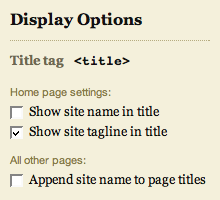
With the new <title> tag constructor, you can control the structure of the <title> tags on the various pages of your site. Prior versions of Thesis did not give you any control over this crucial element, but in version 1.1, you’ve got quite a few options for this important part of your SEO campaign.
Although the title tag constructor is pretty easy to use, I still recommend checking out the user’s guide to learn more about how to set up your title tags.
New and Improved Post and Page-specific CSS Classes
Although Thesis 1.0 featured page-specific CSS classes, the implementation left a lot to be desired. For starters, only pages received these classes (posts did not), and to make matters worse, the classes were not added to the <body> tag, which would have allowed for completely unique page customizations.
In Thesis 1.1, these classes have been moved to the <body> tag, and even better, you can now choose your own custom class names by using the new slug custom field, as demonstrated in the figure below.
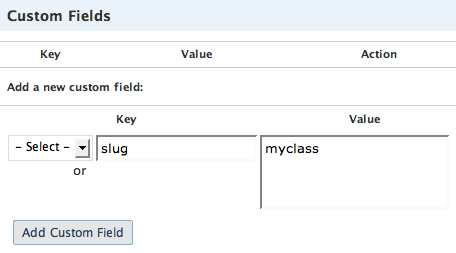
The new slug custom field key allows you to create your own custom class names on posts and pages.
On pages, a custom class name is automatically generated from that page’s permalink, but you can override this by utilizing the slug custom field as shown above. Posts, on the other hand, do not receive a custom class name by default, but if you like, you can add one by using the slug custom field in the same manner.
Cool? I thought so.
Nav Menu Changes
In prior versions of Thesis, the nav menu contained two things that I really disliked and decided to change:
- First, from a user interface perspective, the nav links were sub-optimal because you had to click on the word itself (inside the tab) in order to activate the link. Having the entire tab serve as the active link area is a much better interface solution, and this is another improvement you’ll find in Thesis 1.1.
- Second, the line separating the nav menu from the header area was formerly a background image served via CSS. If you ever attempted to customize the colors of the nav menu, then you probably realized what an annoying roadblock this was (and you probably cursed me as well!). In Thesis 1.1, the gray border is now a simple CSS property that belongs to the nav menu, and as a result, customizing your nav menu colors should prove a little less frustrating in the future.
New Supported Image Aspect Ratios in the Multimedia Box
The multimedia box is a little smarter than it was in previous versions of the theme, primarily because it now recognizes eight standard image aspect ratios, including:
- 4×3
- 3×4
- 3×2
- 2×3
- 5×4
- 4×5
- 16×9
- 9×16
Make sure that the images you upload to your /rotator folder match one of the above aspect ratios. As long as you cover this base, Thesis will output (and randomize) your images perfectly, no matter which layout you’ve selected from the awesome new layout constructor!
Updates to the User’s Guide
If you haven’t checked out the Thesis User’s Guide in a while, now is a great time to do just that. We’ve added quite a few new pages, and hopefully, you’ll be able to use the guide to pimp your theme to the max!

If you’re interested in Thesis, why not have a look at the different purchase options available to you?
About the Author: As the creator of the Thesis Theme Framework for WordPress and the founder of DIYthemes, Chris is obsessed with optimizing the web and making sure every last detail receives the attention it deserves. You should follow him on Twitter here.
If you enjoyed this article, join 25,059 others and get free email updates!

{ 38 comments }
Chris, Thesis was already the best blogging decision I ever made, but it just keeps getting better. Thanks for extra info. I’m still only starting out so I’ve got a lot to learn about style and presentation, but I’m getting there. Thanks.
Dave
Good Job Chris
Thanks for the explanations of the new features, Chris. I learned a few things that I will apply to my blogs.
Pat
P.S. The page pointed to by the “How to Change Fonts and Font Sizes” link is a 404. The correct link is this.
Dave & dinu — Thanks, guys!
Patrick — Thanks for the heads-up on that… Fixed!
This theme just keeps getting better and better! The level of customer support involved here is just fantastic, it makes every penny spent worthwhile!
Chris – I bought thesis on Aug 30 and got an email stating 1.1 is out – is this an upgrade to 1.1 = my site shows 1.1 design.
Or are you just explaining new features?
Thanks
Awesome!
Hi Chris, is the Cosmo Magazine-Style Theme coming out anytime soon? Is there already a design to look at?
Thanks for the update — we JUST installed the first version and are happy for some of these new features.
Is there an easy way to add *stuff* to individual post pages (stuff like ads) without editing the templates? Thanks!
Chris, seconding what Riley said, I also purchased around the same time. I see this on my Design tab:
“Thesis 1.1 by Chris Pearson”
That said, I see you posted this on September 10th,
@RookieMom Heather -
You should check out the forums for questions like this, there are a lot of answers. The short answer though is yes, you can use widgets in the sidebars =). You will need to find an appropriate widget though for whatever you want to use (adsense, private ad sales, etc)
Chris-
I’ve been using Thesis 1.1 since its release, and I’m very, very pleased. Thank you very much for all of the hard work and effort you’ve put forth in a top notch theme. Until Thesis, I was pretty happy with Cutline 3.
Chris,
Some outstanding issues/suggestions I think are still missing one of which I would imagine needs to be done and soon.
1) Comments link. That link should be up at the top of the article or at least the option to do it should be.
2) The author’s name should be a clickable link so users can go the an author page as some blogs have more than one author (mine does). This would help adoption with larger sites.
3) It would be great if the archive didn’t publish full articles as Google considers that duplicate content and will punish site owners so that is a rather urgent tweak actually.
4) Regarding plugins like Buzz!, PingThis!, ShareThis! it would be awesome to have a way of integrating those. Mine look great in FF but saw them in IE7 on a Windows machine the other day and it was a disaster. But I can’t do anything about it because I don’t know browser issues.
5) Forget about how to fix it, either there is an option to remove it built in or it should come out of the box that way. Why is “HOME” even available?
6) There should be some site of separation between Pages and Categories. My thoughts were Pages as primary navigation should remain at the top. Categories should go underneath the title/blog name.
I have more but these were just off the top of my head.
PS. I agree with Riley, I thought this was released two weeks ago. Its creating confusion. Please clarify.
Riley, Sid — Thesis 1.1 was released on August 29, but I had not yet constructed an in-depth launch post to detail the new features in this version. Although most of the features are self-explanatory for users with some blogging experience, many of the core concepts in Thesis are completely new to DIYthemes customers. As a result, I have to spend some time creating detailed documentation that will be useful to n00bs and experts alike.
For the record, whenever there is an actual new release of Thesis, it will receive a new version number like 1.1.1 (for example). That way, you’ll know if there is, in fact, a new version that you need to grab.
RookieMom — In version 1.1, the only really simple way to add “stuff” is to place it in the multimedia box. You can do this by leveraging the
customcustom field on individual posts or pages. The implementation is nearly identical to theslugcustom field described (and pictured) above, except that you use “custom” for your key instead of “slug.”Roger — Here we go, in order:
Chris — No official word on the Cosmo release date yet, but I am hoping to launch before the end of the month. Also, there probably won’t be anything to look at, simply because Cosmo will be a framework like Thesis. I don’t create layouts and mock-ups in Photoshop first, so that’s why there’s nothing to see.
Sounds great!
One question – Does the Layout Control allow you to have different layouts for different pages (a three column for most layouts, and then a two column for the ‘About’ page, for instance) or does it change the entire web site?
is there a way to make each image have a url? That feature would make this blog take off.
Scott — The layout constructor governs the layout of the entire site, and in version 1.1, that cannot be manipulated on a per-page basis. The behavior that you’re describing is probably more befitting of a layout where articles are not shown in their entirety on the home page (but are then expanded once you click through). By default, the forthcoming Cosmo theme will behave in this manner, and I suspect that Thesis will also feature similar options in the future.
CJ — Technically, each image does have a URL, so I’m going to assume that you’re asking for an image page that is styled like the rest of the template. If that is, in fact, what you’re talking about, then it is slated for inclusion in a future version of Thesis.
You Rock!
I’m about to upgrade to the developers license so I can create another site – now I can’t wait to play!
You’re a legend, Chris! Thank you for this awesome theme and all the work you’re put in. For a complete noob like me, you make blogging such a pleasure. Cheers!
Hi Chris,
This sounds great, I agree on the simplicity of the design panel but on the other side, there is a great degree of complexity on the structure of the css, php files, etc. which makes thesis editing very difficult. It is not your typical file theme composed of 6- 10 files — (header, footer, page, main, post, css, search) but rather I had to browse through numerous files, classes, functions, php, etc. just to rearrange some stuff on the layout or change the width of the themes. Even with the 1.1 constructor layout, one has to be content with the fixed and limited width and layout choices and everyone would still get the same look and feel of thesis theme no matter what. I get frustrated when I see thesis all around the place that no matter how much tweaking one does to the design options panel, you still get the same look and feel. You know it’s thesis.
I have bought the developer license but haven’t rolled it out yet since it was difficult to customize thesis similar to the theme I am using on my site. There was a lot of work to be done, and I found out changing items break the system and the complex way that thesis was coded makes it more difficult.
My question, is there going to be an sdk or document manual you would be releasing so that anyone who would be making changes doesn’t have to grasp the programming logic and structure of thesis?
I am sure that you would be able to develop thesis to a point that layouts, inputted widths, arrangement of menus, tags, headers, are point and click stuff. But until then, I have no choice but to dig deep into your structure which isn’t plain and simple.
By the way, I am a Microsoft SharePoint & C#.NET Architect, and maybe that is the reason I find php programming and structure of classes a little fuzzy to what I am used to. But still, I think I am technical enough to dig into thesis but still, I find it requires a lot of effort compared to most themes. I can just imagine other people making changes, which explains why the css customization forum has so many posts and is very busy.
By the way, I downloaded Kingdom Geek’s CSS file found on his signature and that was a big time saver. I think if you could release something similar to that one with complete customization on items with comments, it’s a big help. Aside of course from an sdk or manual.
CP-
Not quite, but my English was poor. What I’m wanting is each image to be able to link to a seperate page either on or off site. This could allow us to intermingle display ads with pictures in a novel and nonobvious way, and allow you to take this theme as far as it can go.
So the “image” would be “click here to select the best Mechanic in X” .
Anyway, I am greedy for more features, because you set the bar high and priced it with such awesome software as ‘final cut express,’ so away we go…;-)
Hey Chris!
Is there a way to set the order of the Tabs without having to deal with PHP code? Right now the sorting of the tabs are hard to control.
Thanks!
Andy
Hey Andy — this plugin works well with Thesis and gives you 100% control over the page order.
Enjoy!
Enjoying Thesis, thanks for developing it.
Hey Sara,
Thanks for the link. It solves 1/2 my problem now. Now I have to figure out how to sort for catagories.
Andy
Milo — I totally understand your sentiments about the theme, and from a knowledgeable developer’s perspective, I tend to agree with just about everything you say. However, the marketplace is about 1% developers, 99% n00bs, and my job is to build systems that accommodate everyone.
I’m working on some documents and templates that will be advantageous for developers and people wishing to roll out highly customized versions of the theme. It’s all part of the long term vision here, and hopefully, this will all be materializing over the next few months.
CJ — Future releases of Thesis will include the ability to link your random images.
Andy — You can also leverage the “page order” field (accessible on the editing screen for each individual page) to change the order of the pages in your nav menu. As for categories, I’ll be able to provide a few options for sorting in the future (alphabetized, by ID, etc.), but there’s no guarantee that any of these sorting mechanisms will be perfect for your site.
Will the next version have an easy way to replace the header with an image? I read in the forums that it’s possible to do it using some CSS, but I didn’t like the method because it involves hiding text using CSS, which is not something Google likes. That feature would be great, something similar to the multimedia box where you can choose your logo image. Thanks!
Chris — Yup, that is fair enough. I trust that thesis is going to reach a point that is valuable to both developers and the rest of the market alike. That is why I bought the theme.
Aseem — I’m working on a header image uploader that will be simple and completely SE-compliant. Hopefully, I’ll have it done for the next release.
Thanks Chris…also you may want to check out compatibility of the theme with IE 8. I’m running it on my site online-pc-tips.com with two columns and the side bar shows up way at the bottom in IE 8 only. I even removed all CSS customizations and it still looks like that.
Another nice feature would be to have the option of moving the header image above the nav bar, instead of the nav bar being above the header.
Great theme overall! Looking forward to more updates…can you write up a post on the features that will be in the next release. Thanks.
Aseem — I’m disappointed to hear that Thesis isn’t rendering properly in IE 8, simply because this is a clear indication that Microsoft still hasn’t addressed some of the core problems with their browser’s CSS engine. In order to get the theme to behave properly in IE 8, you’d simply need to extend the IE-only stylesheets to cover version 8 as well.
Right now, the IE-only stylesheets are being applied to versions 7 and below, so that’s why Thesis looks janky in version 8. Again, this is disappointing—Microsoft should have fixed this in version 7, and the fact that they haven’t (at least not yet) in version 8 makes me hate them all the more.
Oh, and yeah, I’m right there with ya on moving the nav menu around. Look for more flexibility in that department in the next release.
Chris, I feel your pain! I’m sure yours is much worse since you have to design a theme to be compatible with 5 browsers and three versions of IE!
I noticed the IE stylesheets in the header and will go ahead and create an IE8 one to see if I can fix the issue. You know off the top of your head what I would need to put in the IE8 only stylesheet for it to work properly.
I created a thread on this in the forums, but for some reason it’s “closed” and no one is responding on it. Thanks!
How do sub pages show up in the navigation menu? Drop down?
I love Thesis and will likely buy it soon. But I don’t want the Multimedia Box. I’d rather have nothing there or some 2-across display ad (like this Thesis site for example. Is there an option to remove it, or do I have to make some mods?
Maark — The Thesis multimedia box is pretty flexible. By default, you can choose to display rotating images, your own embedded video, custom code, or nothing at all. So to answer your question, yes, you can easily remove the multimedia box without having to make any modifications whatsoever.
Such useful information. I love this them and wordpress and I have only scratched the surface.
I am very new to WP, Thesis and website creation overall.
I have managed well and enjoyed the learning curve allthough it has also been overwhelming.
I understand much more following the infromation available on your site. I found it whilst looking for a solution to a problem I have.
I was experimenting with the Rotator File Images, for the Multimedia box, substituting the default for my own and I named the sample ones so I know exactly what they are as I want to use some of them.
I noticed on the files arrange themselves alphabetically so renamed the photos I wanted to use A picture, B picture etc so they displayed in the order I want – not yet knowing if there is a better way to do this which I am sure I will find.
When I had begun I realised I should have resizied the images and saved them at a lower quality prior to uploading them in to the Rotator file for display on my website.
I went back to delete them and succeded with all but one, which for some reason I can not delete. I receive the following message when I right click and delete (on the image)
Failed. A file with that name may already exist, or you may have mis-typed the folder name.
I have also noticed if I try right click and open, this does not work it is just a white space with a red cross in the corner very similar to those e-mails where you have to right click to download image.
On the actual website the image is too large and is on every page single page and I can not seem to find a way of deleting it.
I have also noticed that the Icon next to the image title is different to those of the default JPEGS. It is unclear but it is green where as the icons next to the other titles are the standard JPEG icons.
I hope that makes sense, but please do bear in mind I have just started. If any one is able to supply a solution even if it reinstalling or similar please could you kindly explain in very basic terms and step by step.
I need to delete this photo or restore the folder to its original state to start again, but without loosing what I have done so far if possible
Thank you in advance
Best Wishes