It took me a lot longer than expected to bring this bad boy to market, but the day has finally arrived. Thesis 1.0 is now ready for download, and I think that after five minutes of poking around this new platform, you’ll agree that the WordPress theme world will never be the same.
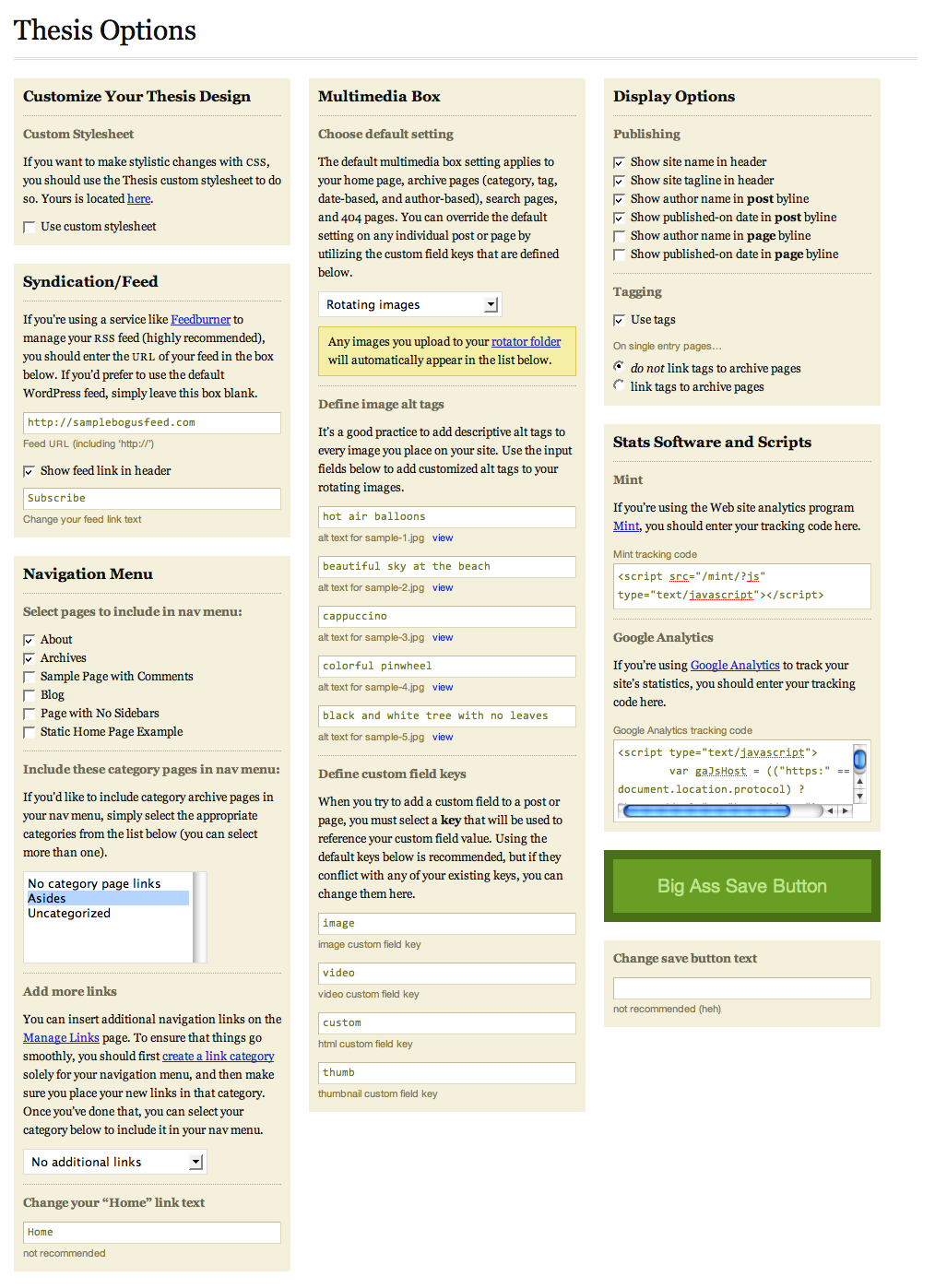
I’m headed out of town for the weekend, but when I return, I’ll publish a huge launch post detailing all of the new features and changes to the theme. In the meantime, please know that version 1.0 represents a complete overhaul of the core code, and every template file has been improved in some way. Don’t fret, though—your custom styles will still apply, with the only exceptions being a few elements that have been modified (for instance, sidebar headings are now served inside <h3> tags).
In order to hit the ground running, you’ll want to place your existing custom.css file inside the new /custom folder. Other than that, you’ll be able to control just about everything from the all-new Thesis options panel, which boasts a pretty intuitive interface.
Although I’m going to be out of town for the next couple of days, I’ll be active here in the comments and in the forums, and I’ll be anxiously awaiting your feedback on this—dare I say it—revolutionary new platform!

Not yet a Thesis user? Hate having to mess with code to get the results you want? Pick up Thesis 1.0, and experience the options panel that will allow you to unleash all the hidden goodness that WordPress fails to give you by default!

{ 5 trackbacks }
{ 93 comments… read them below or add one }
Wow, Chris. Well done. Will have to give this a whirl shortly.
Like it a lot. Nice work.
Excellent!
Not sure what I’ve done wrong, Chris, but I can’t view the options panel. Getting this error: Call to undefined function: array_diff_key(), with reference to line 185 of options.php
This is occurring on my test site, which is using WP 2.6 alpha (haven’t updated it in about a week), if that matters.
Anyway, in looking over the code: WOW! What an incredible job of coding.
Have a great weekend.
Dang, I always think of a second question after hitting submit. After looking at the large options image you made available via Twitter, I noticed an option of mint and Google Analytics. Great add. My question, though: can I just substitute my pmetrics code into the “mint” box … that is, does thesis really care that it’s mint, or just that it’s js from one of the metrics folks?
Bruce — Crap, I just learned that the
array_diff_keyfunction isn’t supported in PHP 4. I’ve emailed you regarding an immediate fix for this issue.Regarding the Mint and Analytics boxes, you can actually use them to insert any kind of script you want. Dunno why that never occurred to me before… If you need your code in the header, use the Mint box. If you need it in the footer, use the Analytics box.
Hey Chris,
Great to have the new version out. I’m getting this message across my navigation menu:
Warning: implode() [function.implode]: Invalid arguments passed in
/header_functions.phpon line 158.Not able to figure out from what.
thanks.
Daniel — I just added some code that should fix your error. Try downloading the theme again, and if you want, simply overwrite the
header_functions.phpfile that’s located inside your/lib/functionsdirectory.Chris, thank you very much for straightening out my problem. I had forgotten that my test server uses PHP 4 instead of 5 … I didn’t realize anybody used 4 anymore.
Thanks for the fix!
Ohh Chris , thank you for this !!!! not uploaded it yet on any of my sites but I wish I had seen this earlier as ive just devved v0.3 today for a playschool ( http://www.emleyplayschool.co.uk ) and i’m really pleased with it . Its not just finished yet but i’m even more excited about easily transfering the custom file + rotating images over to this new version and getting the same / even better results .
.
Will you be doing a mail shot to your subscribers ?? Or are just keeping those who come here often in the know ??
Keep at it …
G
ps. Oh now you’ve released this will you be updating / having a look at the Neo theme at all ?? Maybe even release it here as a ‘paid for’ theme.
Chris – I’m getting some weird errors when I enable the Multimedia Box and set it to rotate images:
Warning: getimagesize() [function.getimagesize]: URL file-access is disabled in the server configuration in
/multimedia_box_functions.phpon line 74Warning: getimagesize(sample-1.jpg) [function.getimagesize]: failed to open stream: no suitable wrapper could be found in
/multimedia_box_functions.phpon line 74Warning: Division by zero in
multimedia_box_functions.phpon line 139Looking good. Options Panel is great.
Thanks Chris. All better now.
Cool!!!! I’m going to make the upgrade tonight!!!! Thanks, Chris!!
Wow Chris, this looks fabulous! Downloading now and will test as soon as is humanly possible! Enjoy your long weekend, and thanks again! This theme has been worth every cent!
To install am I just putting the new theme 1.0 in the themes folder? When I did this and activated thesis 1.0 my page tabs at the top were missing as well as the rotating image box to the right and my blog title. I changed it back to v. 0.3 but I’m wondering exactly how to do the upgrade.
Thanks!
I would use this theme if it was ONLY for the Big Ass Save Button. Pure genius.
Hi, chris, I have a question: Is it allright that the google analytics code doesn’t appear in the “footer.php”?? I mean, I did put the code in the Theme Options, Will that be enough?
Chris or anyone… how do we change the order of the menu items?
Just downloaded 1.0, but I can’t play around with the theme until my DNS settings kick in.
I’m really anxious to know though… Does 1.0 provide for selection of two or three column layouts?
Thanks for the update Chris, already sounds like a beaut even before uploading it.
I updated to the new Thesis 1.0 – worked quite well overall.
I’m awaiting to see release notes and tutorials; I had to make minor changes to the lib/functions to get some things working as I needed/wanted – but then I noticed a “custom functions” file in the custom folder. I am trying to figure out if I can override functions defined in the lib/functions folder this weekend.
Enjoy the weekend, looking forward to learning my way around Thesis 1.0!
Hi, Chris! Congratulations for your incredible work. At present I’m using drupal for my website, and I’m seriously considering to move towards wordpress and use your theme. I’ll probably migrate and buy your theme today, but I would like to know if there’s some possibility of changing the default English language to Spanish, or if there’s an easy way to translate the theme and use a multilingual version —that was my first idea about my website—. If you’re thinking to translate thesis and you need help with the Spanish version, please, don’t hesitate to contact me, I really would like to make your work available to a wider public.
Regards.
Graham — I should absolutely send an email out to the membership list… Dunno why I didn’t think of that! And regarding Neoclassical, I’ll probably transform that into a paid theme in the future, but I have two other platforms that I’m going to bring to market before that.
Casper — Based on your errors, I think it’s safe to conclude that on your hosting company’s server configuration, URL file access is disabled. This may be a setting that they can change for you at the server level; if it’s not, then I may be able to work with you on a custom fix.
In all honesty, though, a custom fix would be highly inefficient in this case. The reality of the situation is that disabling URL file access is a limiting disservice to users, and I honestly don’t see how some hosting companies think they can pull garbage like that and remain competitive. The mere fact that they’re “holding you back” would be enough for me to jump ship, but then again, I am probably a little more reactive to things like that than most
Oh, and regarding your question about changing the order of menu items, you can only change the order of your Pages in the first section of the nav menu. By assigning a unique numerical value to the Page Order field at the bottom of the Write Page screen in your WordPress dashboard, you can essentially dictate the order in which these pages will appear in your nav menu.
I just looked at your existing nav menu, and the best you could do with the new system is a menu with items in the following order (this assumes the use of a static home page as well):
Because of the way the menu is constructed, the Pages have to come before the category archive links. I realize this is not the “perfect” solution, and believe me—I hate to think that some users will view the current setup as worthless simply because it cannot accommodate their particular case. I’m always working towards a best-fit solution that will accommodate everyone, and hopefully, I’ll be able to offer a completely tweakable navigation menu in a forthcoming release.
In the meantime, you could simply comment out the call to the navigation constructor in
header.php, and you could replace it with an include that contains your navigation links (likenav_menu_items.phpfrom version 0.3):Sasha — That is the natural behavior of 1.0 when you first upload it. In order to get everything working properly, you simply have to visit the Thesis Options page one time (because the visit triggers code that sets up all the default options). So essentially, all you had to do differently was stop by the options page for a second, and you would’ve been good to go. Frankly, I’m a little heartbroken that you weren’t dying to take a look at the new options panel! I kid, I kid
Fausto — That’s definitely not okay. Unless the Analytics code gets rendered in the HTML, there’s no way it can track your stats. I noticed that you were able to get the code into the footer; did it ultimately work via the options panel as it should have?
David — Thesis 1.0 does not contain that option. Originally, I toyed with the idea, but given the relative widths of all the elements in the theme, I think it makes more sense for me to release a completely separate 2-column version. I think it’s worth noting that I have a personal interest in producing a 2-column Thesis, simply because I much prefer 2-column layouts!
Karnatos — I don’t want to get too technical here, but overriding functions would likely require a call to
wp_apply_filtersto be present in the function that you’re trying to override. As it stands now, none of the default functions are equipped with that call, so that’s something you’d need to add yourself. Once you’ve done that, you’ll need to add anadd_filtercall in/lib/launch.phpto initiate your own function. And finally, all of this runaround leads me to one burning question—what did you want to change?Jorge — One of the best features in Thesis 1.0 is the internationalization. I’ve set everything up to use text domains, so in theory, you could set up your own and implement it through a call to:
load_theme_textdomain('thesis');in your
/lib/launch.phpfile.Because Thesis is a paid theme, it would only be possible for me to host separate language versions here on this site. However, I think that you can make text domains “pluggable,” so it’s quite possible that you could simply offer the text domain itself with instructions on how to activate it inside Thesis.
Either way, I’m open to any and all thoughts on the topic. Thesis was meant to be internationalized, and I honestly don’t know the best way to go about all that at the moment. I do know that your enthusiasm to perform a translation is excellent, though, so let’s see what we can do!
Chris,
I found this online and would like to know if you are going to update your template to reflect this information about header tags, or is your theme already designed for this?
chris — The information shared on that site is not, in fact, the best way to organize your markup. Thesis features a more optimized setup that is based on research and techniques that I’ve explored over the last couple of years. If you like, you can read up on some background material in my series, SEO for everybody. Also, to get a better idea of the theory behind Thesis’ markup structure, you should check out the Definitive Guide to Semantic Web Markup for Blogs.
I suppose it’s worth noting that a lot of the work I’ve done in the past on SEO-based markup has been well-cited throughout the Web, and I’m considered somewhat of an authority in the SEO markup space. I’m not offering up this info to boast; but rather, I just want you to rest assured that you’re in good hands with my markup!
Yes, it did work via the option panel, thanks, I get a little bit confused, that’s all.. Sorry… and thanks for answer…
Chris,
I’ll read the information that you have shared.
I miss the author highlight in the comments.
Hi Chris,
Thanks, I just get a bit scared making changes sometimes because I’m so bad at the web stuff but so far your Thesis theme has made things a lot easier for me.
I got all my images and pages back how they were before but the one I’m still having trouble with is the custom backgrounds. In V.03 I was using the grid background. The color is still the same but no grid.
I put the custom images folder in my theme folder like before but when I go to Theme editor, my custom.css is not showing up in the list. I put my previous custom.css file in the custom folder like you indicated.
For fun I moved the custom.css file up one level in the main theme folder and while it did then show up in the Theme editor list, when I tried to make changes, nothing happened.
Any tips?
Thanks so much
Sasha
Chris:
Is is possible to put rotating text in the upper right part of the theme instead of a rotating images?
I just found out about your work a couple days ago. I can’t wait to see what your next release look like.
Thank you very much.
Jon
Chris,
I continued to have a couple of problems on my test site (options would not save), so people with PHP 4 may have some issues. However, I went live with it on my real site (PHP 5), and the transition was very smooth. GREAT WORK!
The STRICT doctype has caused a couple of little minor validation probs to surface … for example, one of my ads uses a “target” in the link, and apparently Strict 1.0 does not like that. I’ll research it some, and may just ultimately just ignore it. There is one validation error though that may be of interest, as it relates to the commenting code:
I got this when validating one of the single post pages. Again, probably not a big deal at all, but thought you would want to know.
You have done one helluva lot of fantastic work on this, dude. Mighty fine coding. Mighty fine. Will take me a while to understand how to hack some of it (like having static, vice rotating images, on a couple of pages), but gives me something to do, eh? And I get to learn in the process. Cool.
Thanks again. Hope you’re enjoying the long weekend.
Chris,
Can I sell this splendid theme as an affiliate?
cheers
Tony
Chris:
I do have one more question for you. My tech knowledge is very limited and I have no knowledge on how to manipulate code. With this in mind, is a guy like me going to have trouble using Thesis. I do not want to make any major changes to the theme, just a couple minor tweaks.
Also, does it come with any “how-to” tutorials and or videos.
Thanks Chris.
Jon
Brilliant. I did not think Thesis could get any better, and it just did. I LOVE the options panel. And like someone else said, it’s worth the money alone to have the “big ass save button.”
Chris,
Jon has actually raised a very good point.
If you included ‘how to’ video tutorials with your theme you would likely skyrocket your earning potential and produce a win/win situation for everyone.
In other words, you would have the ultimate package deal as your themes are SEO friendly and they come with easy to follow instructions for newbies. You could even make some videos to give people instruction on how to locate and market products with your theme.
Perhaps you could have two options. You could have a newbie option which includes all of this stuff and an option for advanced users who already know what to do.
But whatever you choose to do, I think the idea of having video tutorials is a great one, even for advanced users. For example, I know how to locate and market products, but I don’t know how to tweak your theme. So video tutorials covering this would be very helpful to me.
Just some food for thought.
Keishon — My author comments are still highlighted… Has anyone else noticed strange behavior with the author comments?
Sasha — Thesis 1.0 has a totally reorganized file structure, and that’s why your custom background isn’t working at the moment. Follow these steps in order to restore your background (and hopefully gain an understanding of the new file structure):
/customfolder which houses yourcustom.cssfile and a single/imagesfolder. If you like, you can simply upload the entire/custom_imagesfolder to the/customfolder. If you do this, you’ll have 3 items in your/customfolder—one.cssfile and two folders.custom.cssfile. The definition for the background graphic contains a reference to'custom_images/bg-grid.gif'. Because you’ve now got a/custom_imagesfolder, the original CSS reference will work properly.Now, with all of that said, there’s a cleaner way you can go about this, and this is actually what I would consider to be the preferred method. Simply take all of the graphics files from the
/custom_imagesfolder and move them to/custom/images.Next, change the custom CSS for your background from this:
to this:
Oh, and please keep in mind that my advice here assumes that you haven’t modified the default 1.0 file structure in any way, so make sure you’ve restored everything before trying this out!
Jon — In theory, yes, you can place rotating text in the multimedia box portion of the theme. In practice, however, this may prove difficult and ill-advised, especially since you said you don’t have much experience wrangling code.
Thesis 1.0 comes with 3 different setups for the multimedia box:
The first two are pretty self-explanatory, but the third option, custom code, requires a little more detail. Essentially, you can enter any code you want into the box provided in the options panel, but you must stick to HTML and JavaScript (this is a natural limitation of the setup and not something I’ve imposed).
With the exception of using JavaScript to handle the text “rotation,” you actually cannot achieve the effect you’re after from within the options panel alone. In order to create what you’ve described, you’d have to involve the use of a separate
.phpfile that randomizes whatever custom code you’d like to serve.Of course, reading back over the last couple of paragraphs, it’s clear to me that this is not something you (or any other user, for that matter) are going to be stoked about doing. I think I may have just come up with a way to randomize snippets of code with relative ease, so I will likely explore that for the next release of the theme.
This is one of those things that you’re probably better off waiting on, but regardless, I bet that someone over in the forums can cook up a quick randomizer based on the old (and now deprecated)
rotating_images.phpfile from older Thesis versions.Bruce — Unfortunately, PHP4 is still so widely used that I cannot simply gloss over the details of the problems you experienced on your test server. I think a couple of users have encountered similar issues over in the forums, so I’m now working with them to see if I can cook up some special fixes that will make Thesis 100% PHP4-friendly. Thanks again for keeping an eye out!
Oh, and regarding the validation “error,” XHTML 1.0 strict likes to yell at you when you fail to place an
inputelement inside a block-level tag (like a<p>), even if the element is hidden. I’ll move the offensive, hiddeninput(the audacity!) for the next release.Tony — In keeping with the recently established “The Users are Reading My Mind” theme, you’ve brought up an excellent point. I’m working on a robust affiliate system now, and I hope to have it fully implemented within the next couple of weeks. I’ll definitely be making a big deal of this thing, so just stay tuned to this site for details. Better yet, grab the Thesis feed, and let RSS do the legwork for ya!
Jon — My overarching goal with Thesis is to provide an environment for novice users to run an extremely powerful Website with remarkable precision. The new options panel represents the first big piece of that puzzle. The next piece is for me to build up robust documentation around the new options panel and the amazing things you can do with Thesis, and this is where video tutorials come into play.
Once I’ve finished documenting the new features in 1.0, I’ll begin working on simple screencasts that will serve as instructional tools for users like you. Without question, video is the best medium for relaying precise information on how to use software, and Thesis will not be “complete” until all of the necessary video documentation is in place!
In the meantime, you can find some helpful tips and instruction in the user’s guide. This is where future screencasts and things will be housed, so it may be a good idea to go ahead and familiarize yourself with that area of the site.
Toblerone — I really just wanted to be able to write “and make sure you hit the Big Ass Save Button” in tutorials and comment responses
chris — I think video tutorials are essential for everyone, and I’m going to offer them to all of my customers, regardless of their license. Fortunately, version 1.0 is easy enough to use that I can now construct a bunch of no-nonsense video tutorials that will really help people make the most of the theme.
I would have loved to create a library of videos sooner, but honestly, the theme wasn’t at a point where I thought I could get long-term value from the videos. Since they’re kind of a pain in the butt to produce (I’m a stickler for quality), I decided to wait until I had a platform that was actually worthy of some nice instructional videos. Now that Thesis 1.0 has arrived, however, it’s time to bring on the videos!
Well,
Since you are planning on bringing on the videos I will go ahead and purchase Thesis.
Please do me a favor however, and make a video to show us how to do the custom styles sheet. I don’t know how to set it up.
Thanks!
chris — Thanks for the vote of confidence! If you need help with your
custom.cssfile in the days ahead, please don’t hesitate to let me know! I’ll work with you via the forums to answer any and all questions that you may have.Jon – You said: “Is is possible to put rotating text in the upper right part of the theme instead of a rotating images?”
Make the text you want to rotate into graphics. You would not have to worry about code and you could control the layout much easier.
Chris – Thanks! I’m enjoying the 1.0!
Yancey:
Thanks for the suggestion. I appreciate it.
I just have to learn how to turn text into an image. It sounds like this will be easier than dealing with code.
Jon
Chris,
I checked with my hosting company, Media Temple, regarding the URL file access being disabled and they said:
” It’s a very common error in WordPress. The solution provided by WordPress administrators is then officially don’t hotlink images for this PHP function. Although, I have a feeling it is still possible if you enable the “allow_url_fopen” directive in your php.ini file.”
Is this the best option? I’ve seen a lot of stuff about Fopen being a security risk.
Thanks for the menu tips. Using the old school nav_menu_items.php method works swell since I have category archive pages before Pages in my menu. Looking forward to that “tweakable navigation menu” goodness in the future releases.
Cheers!
Chris: I have the same host and issue as Casper. I also wanted to add that sorting options for the pages would be nice.
Hey Chris, simply amazing! How do I get my header graphic to appear? Everything else is fine but my custom header. Thanks!
Hi there! I love the theme, but I have a big problem with images in the rotator, as you can see here. My host is Media Temple, just in case…
Ok, I solved it! I think it was the same problem that Casper has. It simply works if you remove line 74 and 139, as you can see in my site. Hope this works for you. Anyway, Chris, do you know if this procedure could imply a problem with the stability of the website? All the best.
Yay, Chris. Just what I was waiting for before upgrading to the developer’s license!
Thanks for posting your solution Jorge, now I too have commented out lines 74 and 139 and it appears to be working.