Login ↓

Thesis 1.0 is Available Now!

by Chris Pearson on July 3, 2008

It took me a lot longer than expected to bring this bad boy to market, but the day has finally arrived. Thesis 1.0 is now ready for download, and I think that after five minutes of poking around this new platform, you’ll agree that the WordPress theme world will never be the same.
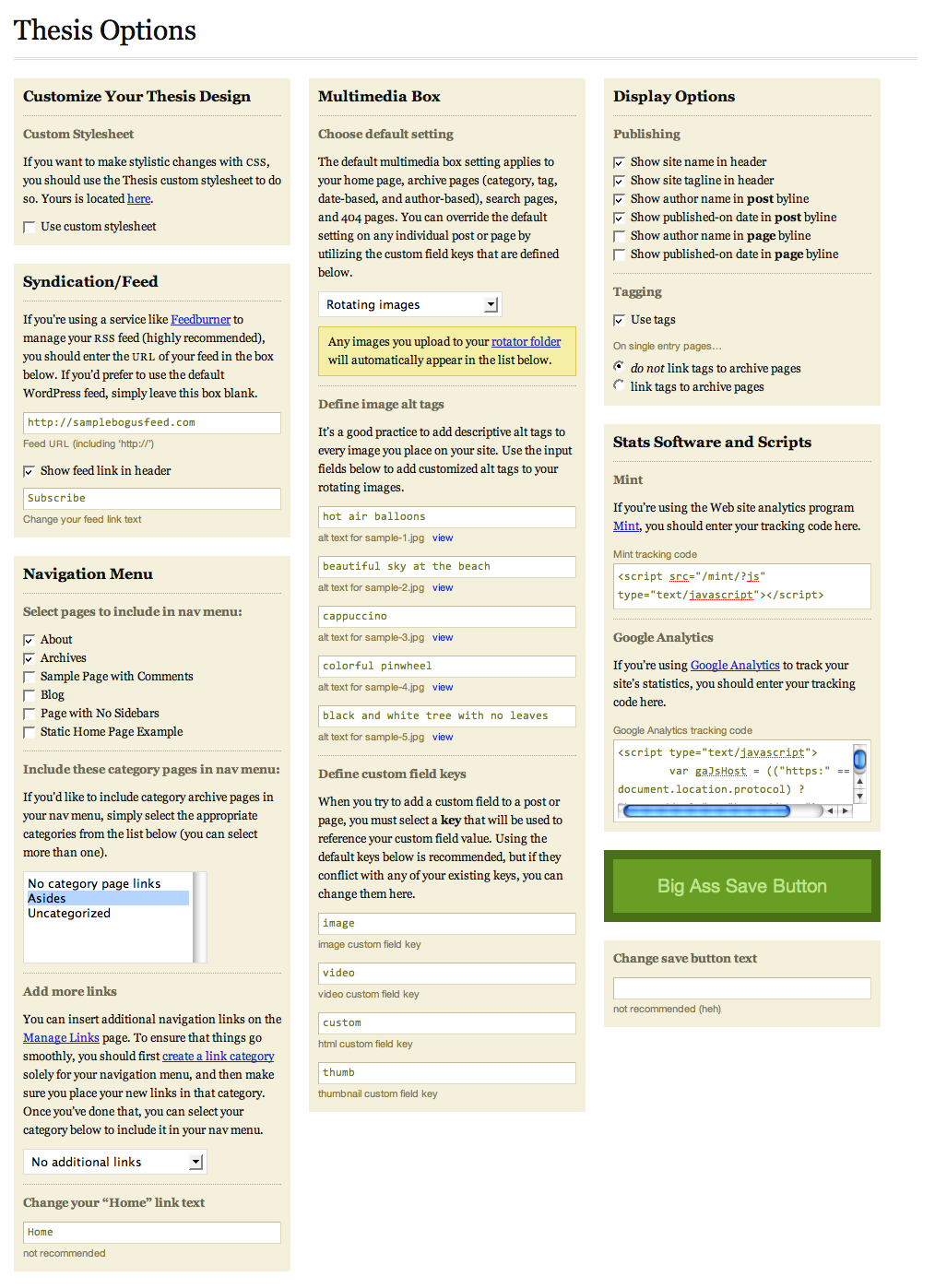
Thesis options panel

Click the image to see a huge screenshot of the Thesis options panel!

I’m headed out of town for the weekend, but when I return, I’ll publish a huge launch post detailing all of the new features and changes to the theme. In the meantime, please know that version 1.0 represents a complete overhaul of the core code, and every template file has been improved in some way. Don’t fret, though—your custom styles will still apply, with the only exceptions being a few elements that have been modified (for instance, sidebar headings are now served inside <h3> tags).

In order to hit the ground running, you’ll want to place your existing custom.css file inside the new /custom folder. Other than that, you’ll be able to control just about everything from the all-new Thesis options panel, which boasts a pretty intuitive interface.

Although I’m going to be out of town for the next couple of days, I’ll be active here in the comments and in the forums, and I’ll be anxiously awaiting your feedback on this—dare I say it—revolutionary new platform!

Not yet a Thesis user? Hate having to mess with code to get the results you want? Pick up Thesis 1.0, and experience the options panel that will allow you to unleash all the hidden goodness that WordPress fails to give you by default!

{ 5 trackbacks }

Holiday Wishes, Consumer Tips, and More
July 3, 2008 at 6:47 pm
links for 2008-07-04 | Gunnar R Johansson
July 4, 2008 at 4:31 pm
Thesis 1.0 WordPress Theme Now Live! — TopColorBlogs.com
July 6, 2008 at 12:33 pm
{ Thematic Photography } — T h E ~ b L i S s F u L ~ p I x E L
July 6, 2008 at 10:20 pm
Why Einstein Became An Immortal Celebrity (and how your company can join him), Success Factors Day 3
January 3, 2009 at 12:11 pm

{ 93 comments… read them below or add one }

Chris Pearson July 7, 2008 at 11:05 am

Casper, Colin, Jorge, and Yancey — Removing lines 74 and 139 per Jorge’s suggestion is going to severely limit the image-handling ability of the multimedia box. I worked on this problem last night, and with the help of a couple of users, I was able to code up a smoother solution that does not require direct URL file access.

The new and improved version is available for download, and for those of you who’ve experienced problems with URL file access, the two files of interest to you are:

  • /lib/admin/options_page.php
  • /lib/function/multimedia_box_functions.php
Chris Pearson July 7, 2008 at 11:17 am

Miguel — In order to get your header image to appear, you’ll need to do two things. First, you need to move your desired header image from its current location to your new /custom/images folder. When you were using Thesis 0.3, you had a /headers folder, and that’s where your header image was located. That folder no longer exists in Thesis 1.0, and basically, all you need to do is move your header image from that location to the new location I specified above.

Next, you’ll need to modify your custom.css file to point to the new header image. Try this CSS after you’ve moved the header image, and everything ought to work properly:

.custom #header { background: url('images/header-6.jpg') repeat-x; }
Chris Pearson July 7, 2008 at 11:36 am

Lisa — Awesome! I would think people would be knocking down your door to have you customize a Thesis installation for them. I still find myself dropping by Wild Keys every now and then and letting out a smug and content, “Ahhhhhhhhh!”

Miguel Wickert July 7, 2008 at 11:57 am

hey Chris, thanks I’m working on it. How do I expand my content box? Just a little wider, I also wanted to reduce the borders. Thanks!

Miguel Wickert July 7, 2008 at 12:11 pm

All hells broke, ” blank!” I need to relax but this site is starting to piss me off! Apart of the learning process.

Miguel Wickert July 7, 2008 at 12:31 pm

Hey Chris, can not get my header or borders to work properly ? Thanks for the help!

Chris Pearson July 7, 2008 at 12:41 pm

Miguel — Your new custom.css file, which is located inside the /custom folder, is empty. Place your desired header image in /custom/images; place the definition I gave you above in your new custom.css file; and then everything should work properly.

Miguel Wickert July 7, 2008 at 1:01 pm

yeah bro, I’ve tried it and sorry to say, still doesn’t work. The theme also lost its customized borders, which is similar to the look of this site. I cannot get the header and borders to show?

Miguel Wickert July 7, 2008 at 3:05 pm

oh yes! Got it! Thanks Chris!

Miguel Wickert July 7, 2008 at 3:07 pm

hey Chirs, take a look here: http://beyondadiet.com How do I fix the header? Its been cut out a bit at the bottom.

Eric Rusch July 7, 2008 at 3:23 pm

Hi Chris. While we’re beating the header thing into the ground, could you please advise on mine too (on v1.0) ?

I’m trying to install a 938 x 117 header (can alter if necessary but somewhere I thought I read 938 was the right width).

I uploaded the image to custom/images and added this to custom.css:
.custom #header { background: url(’images/BreadtopiaM938wide.jpg’) repeat-x; height: 117px; width: 938px;}

As you can see (breadtopia.com/thesis) it’s sorta close I think. But bottom of image isn’t filling the space I created and the width doesn’t seem to be enough. I messed around with adding some code from the forum thread (on modifying header) to header.php but backed it out as I was just shooting in the dark and messing it up further.

Thanks. I’m close to going live with this. Appreciating your personal attention to all the details and nubes like me.

Eric Rusch July 7, 2008 at 3:35 pm

I forgot to mention I also don’t want the title and description to show.

Eric Rusch July 7, 2008 at 4:03 pm

I just noticed the header isn’t showing up at all in IE, just FF 3.0. Also, to correct what I said above. In FF, the entire height of the image IS showing, but you can see the fit problems.

Chris Pearson July 7, 2008 at 4:22 pm

Miguel — Start by removing the #logo and #tagline definitions from your custom stylesheet; instead, uncheck the first two settings under Display Options in the Thesis options panel to “turn off” those two elements.

Next, make sure your custom stylesheet contains the following declaration for your #header element:

.custom #header { height: 140px; background: url('images/header-6.jpg'); }
Chris Pearson July 7, 2008 at 4:28 pm

Eric — Because you’re choosing to use CSS to insert your header graphic, you’ll be best-suited by an image that is 960px wide. Once you’ve cropped an image accordingly, make sure that the #header declaration in your custom stylesheet looks like this:

.custom #header { height: 117px; background: url('images/BreadtopiaM938wide.jpg'); }

Finally, go into your Thesis options panel, and then uncheck the first two settings under Display Options. This will remove the title and tagline from the header.

Chris Pearson July 7, 2008 at 4:31 pm

Eric — Also, I noticed that you’d rather not use the Multimedia Box, which is totally fine. However, instead of removing all the images from your /rotator folder, you should simply select “Do Not Show Box” from the Thesis Options panel. There are some subtle coding nuances that come about as a result, and you’ll want to make sure that you have your options set appropriately for this type of situation.

Eric Rusch July 7, 2008 at 8:15 pm

Thanks Chris. I resized the image to 960 x 116 and uploaded it to the custom/images folder. Then added this code to custom.css:

.custom #header { height: 116px; background: url(’images/BreadtopiaM960wideBl.jpg’); }

It’s much better but still repeats underneath. Do you have the fix for that?

It shows up in IE now too.

Regarding the image box, I changed to “Do Not Show Box” although I do plan on using it when I figure out what I’m going to put in there. I’m leaning towards the 6 static tiles like some users have done so well.

breadtopia.com/thesis

Chris Pearson July 7, 2008 at 11:02 pm

Eric — I knew I forgot something earlier, but I couldn’t remember what it was… The #header declaration in your custom stylesheet should look like this (not like what I suggested earlier):

.custom #header { height: 117px; padding: 0; background: url('images/BreadtopiaM938wide.jpg') no-repeat; }
Miguel Wickert July 7, 2008 at 11:45 pm

Hey Chris, thanks bro. You rock! I’m grateful for your effort and reward for us all. You are extremely appreciated.

Chris Pearson July 8, 2008 at 1:50 am

Miguel — Anytime! Knowing that you came into this thing with very limited HTML and CSS knowledge but were still able to build a robust, fully-functioning site is a pretty awesome reward in and of itself. You’re a true DIY-er, if I may say so!

Andrew Biss July 8, 2008 at 2:15 pm

Congratulations on Thesis version 1.0 Chris! I particularly like your clear separation of the custom elements. It makes the theme easier to understand.

To modify the Page Order in the navigation menu I use the My Page Order plugin:

My Page Order allows you to set the order of pages through a drag and drop interface. The default method of setting the order page by page is extremely clumsy, especially with a large number of pages.

Chris Pearson July 8, 2008 at 2:32 pm

Andrew — That plugin is the perfect complement to the Thesis nav menu. I’d love to do something similar for the options panel… I’d even considered doing an AJAXy drag-and-drop interface that would allow you to rearrange the elements of the theme. Now that would really be something!

Lisa July 10, 2008 at 5:27 pm

Chris said:

Lisa — Awesome! I would think people would be knocking down your door to have you customize a Thesis installation for them. I still find myself dropping by Wild Keys every now and then and letting out a smug and content, “Ahhhhhhhhh!”

T’anks. I suspect am having the same trouble you did when you did freelance theme development—lots of interest and not enough hours in the day! Right now, I’m restricting blog mods to current design clients, but hope to be able to open things up in the future.

United Voices July 15, 2008 at 1:42 pm

This theme looks simple but quite cool. Hope a free version of this theme also come out soon. If so, please do let me know. Thanks.

Wayne July 19, 2008 at 8:23 am

Chris:

Is there a simple way to add an advertising section

Thanks

Christopher July 19, 2008 at 1:11 pm

I am looking at possibly using WP for some micro sites we want to put together rather than our full blown CMS solution.

I came across Thesis and WP ReMix, both of which look very interesting. Can you tell me what Thesis does better and worse than WP ReMix?

Chris Pearson July 19, 2008 at 5:52 pm

Wayne — If I recall properly, you already asked a similar question on a different page of this site. In case you missed it, here’s my response regarding (some of) the advertising options with Thesis 1.0.

Christopher — I don’t know anything about the WP-Remix theme, and even if I did, I’m not in the habit of commenting on competitors’ offerings. I can only speak to the merits of Thesis, which features the most finely-tuned codebase of any theme on the market today. Also, I really believe there’s a huge upside to having pixel-perfect typography on your site, so that’s one of the things I don’t even think about compromising. The Thesis design is based entirely around effective use of typography and whitespace, two things that have immediate and significant effects on your site’s users.

Given its current level of flexibility and the direction it’s heading, Thesis is a great choice for any site. Of course, that doesn’t preclude other themes being effective choices as well, but the bottom line is this—you simply can’t go wrong with Thesis.

Christopher July 19, 2008 at 6:36 pm

Chris Pearson,

I wanted to see if I could get a comparison sort of thing, what Thesis does better and ideally what it doesn’t so I can make a good decision. They both look like excellent solutions, I only recently looked into this market as I primarily have been focusing on our core CMS and our main site and I really don’t see WP as a CMS system, but these two systems look very interesting and looks like they would be perfect for some micro sites I want to put together and don’t want to do a full CMS and I will likely have blogging, so it would be nice to use something like WP.

Both products look really good, but there is no demo that I know of, and no video or good run down of exactly what you gain from either site. There are some features lists on both sites.

I couldn’t find a way to contact support or the author, otherwise I was going to email and ask if there was a good comparison between the two and any other theme that would do something similar so I know what I would be getting.

Chris Pearson July 19, 2008 at 7:08 pm

Christopher — I am support and the author, and you’re actually on the Thesis demo now. Actually getting behind the scenes of a theme is not something that I foresee happening in the near future, simply because that would require access to a WordPress dashboard where the theme is installed. This presents all sorts of concomitant-access and security issues, so that’s why you probably haven’t come across it yet.

Once again, I’m not going to go over a competitor’s product and dissect it in that manner, simply because I consider it poor form. I wouldn’t have bothered to create Thesis unless I felt like every aspect of theme development needed significant improvement, so that’s pretty much the driving force behind my efforts here.

If you want a more in-depth explanation of some of the most beneficial features of the theme, please take a look at this post. Also, be sure to read the testimonials of users, as I think it’s important to gain a very clear understanding of how the community feels about the product (and the people behind it!) before you make a decision.

Christopher July 19, 2008 at 7:24 pm

Chris Pearson,

I ran through that post earlier when I first came across Thesis. But I think I am still missing a lot of the picture. For example, are all your changes SEO friendly, do you add any functionality to handle SEO friendly URL’s and address duplicate content issues (like in the date archives, and tags). If I want to put together 3-10 page micro-sites (likely with blogs) will this offer a significant advantage over WP alone, using dreamweaver, or using another CMS?

A video showing the back end and talking about the key advantages would be a great way to give us a better understanding on how it works and what it does for you.

Chris Pearson July 19, 2008 at 8:13 pm

Christopher — Thesis is, first and foremost, the most precise and SEO-friendly framework available today. WordPress itself handles SEO-friendly URLs, and where WordPress falls short—with archives and tags, for instance—Thesis picks up the slack. Tags, for instance, are not linked by default, and even if you do choose to link them, the resulting links are nofollowed.

Although Thesis includes a page template that allows for easy archive creation, I don’t recommend using it for the very reason you mentioned. If you still want the benefit of archives without the associated page bloat, then I suggest adding your archive pages to your robots.txt file.

I find it a bit ironic that you are asking about archives and SEO with microsites, simply because archives don’t seem to be a piece of that puzzle. Because WordPress gives you such finite control over posts and pages (and because this is where Thesis excels), using the theme in this capacity would yield maximally efficient results.

Videos are on the horizon, but I’ve still got a lot of work to do before I get there.

Christopher July 19, 2008 at 8:16 pm

Chris Pearson,

I am thinking beyond Micro Sites, but initially I want to build up a few new blogs that use WP rather than our traditional CMS.

The micro-sites will be a combination of blog/site.

I will likely give your theme a try and see how it works out. It isn’t a fortune to get started, thanks again.

Chris Pearson July 19, 2008 at 8:18 pm

Christopher — Cool. I really think you’ll enjoy the level of control Thesis offers and the ease with which you can roll out highly refined sites.

Lisa July 19, 2008 at 8:24 pm

Christopher: Who is going to be maintaining these microsites of yours? If you are, then you should choose a solution that YOU like. If they are going to be edited by clients or a group of contributors, then you have to think about what will be a system they can manage. The dead-easiest is Blogger, but it’s not as customizable as WordPress. If you want the advantage of a robust backend, without the hassle of coding your own CMS or making a really bloated system do backflips so it can scale smaller, then WordPress is a good choice. If you want to see WordPress with lots of different themes on, there is a theme viewer here. If you want to know more about the admin dashboard, there’s info here..

Theme choice is an entirely separate decision. When you evaluate a theme you should be thinking about a visual design that can be modified to express the nature of the site, that is well-coded and stands up to a lot of different browsers and devices, and Thesis is both of those.

I say this as an independent site designer and producer who can code by hand, also uses Dreamweaver, and has gladly paid the paltry sum to acquire a developer’s license for Thesis. The best way to know if something is a good tool for the task is to build something with the tool.

Lisa July 19, 2008 at 8:33 pm

Christopher: Ah, I see while I was composing my last post, you made a decision… Welcome to the Thesis family. I’m sure you won’t be disappointed.

Christopher July 19, 2008 at 8:46 pm

I am very familar with Word Press, although we are moving our dreamweaver site (merely use DW for an editor, not really to build code) to ExpressionEngine. But because our sites are not overly complex and mainly static pages, a blog, and links to additional resources we may just go with Word Press.

I am looking at Thesis mainly for small parallel micro sites, but possible for our closer to home projects as well if it works out well.

I wouldn’t use any other blogging platform other than Word Press, unless I went to a full CMS and that I would use ExpressionEngine exclusively.

I went ahead and bought a developers license, hopefully we make good use of it.

Jerome July 19, 2008 at 11:06 pm

Hi Chris,

I’ve been using your themes (or variations of them) for a long time now, and I’m really thinking Thesis might solve my issues. I run a satirical news site, and as you can see, I’m currently using a very hacked version of three-column Pressrow. I love Pressrow, and I guess I’m just nervous about the switchover, and that I’ll look like everyone else who has Thesis. I know that’s what the customizations are for, but it’s a concern I have. But Thesis has all the features I’m currenly trying to force three-column Pressrow to have, so it’s really starting to be a no-brainer. It looks awesome either way. Really amazing stuff.

Domenica Vita July 20, 2008 at 4:04 am

Hi Chris,

This is going to sound silly but, few questions:
1. I am a beginner - am I going to able to use Thesis or is it really only for seasoned users
2. My blog will be about Myanmar and human rights issues and the government frequently searches blogs and closes things down. I need to be 100% sure that if I purchase (using my credit card with real name) it can’t in any way be traced to my blog with my fake name for my own security. Is paypal 100% secure or is there a better way to pay you.
3. Will the magazine style set up have rotating images, video etc? Sounds interesting.

Chris Pearson July 20, 2008 at 3:03 pm

Jerome — Judging by the amount of customization you’ve been able to apply to Press Row (which is a far less customizable framework), I think you’ll find Thesis to be a walk in the park. I’m trying to make it so users can do sweeping customizations without touching a bit of code, but no matter what, if you are relatively proficient with CSS, you’ll always be able to bend Thesis to your every whim.

Domenica — Let’s take these in order:

  1. Thesis is actually intended to be the easiest theme to use and to customize for people of all abilities. In fact, the primary focus of my development efforts is to make it drop-dead-simple for a beginner to customize and run an amazing site.
  2. PayPal is secure in that regard—none of your purchase information here on DIYthemes is ever going to be publicly available, and if you use a fake name to protect yourself, you’ll be fine.
  3. There will likely be a lot of image/video options in the magazine layout. Flexibility is the name of the game there, so you should be able to do it all.
Jerome July 20, 2008 at 3:06 pm

Chris, thanks for getting back to me. Yeah, I actually made the jump last night, and I’m playing with it now. It’s fantastic, in my humble opinion. Plus, I figured with the upcoming magazine version on the horizon, it’s pretty ideally suited to what I want to be able to accomplish.

Thanks.

Michael July 20, 2008 at 3:10 pm

Can thesis be modified to not use the left column on the homepage for posts and make it more like a traditional website with a blog? So site content would be on the left, recent posts would be in 2nd or 3rd column and 5-10 inner pages would have site static content in left column.

Can some pages become 2 column if desired?

Chris Pearson July 20, 2008 at 3:52 pm

Michael — You can accomplish what you’re after through the use of a static homepage (a WP-native option) and custom page templates. Thesis comes with a few page templates by default, but none of them are set up for a 2-column layout (at least not right now). Despite that, you could code up your own page template and only call one sidebar instead of two, thereby forcing a 2-column layout on any page that uses that particular page template.

Currently, there’s not a robust solution in place to handle the types of modifications you’re talking about. In order to get a highly dynamic, customized layout like that, you’re looking at a fair amount of custom code work. Despite that, I’m working on more flexible solutions that may actually allow you to choose your layouts on a per-page basis (2 or 3 column, for instance). Only time will tell, though, because can’t say for sure whether or not my future solutions allow for things like that to be done on the fly.

Rob July 22, 2008 at 4:25 pm

Just installed and receiving coding warning on posts and pages (not home):

A bunch of PHP errors that the editor obscured…

No idea how to fix - assistance appreciated - Thanks

Leave a Comment

Previous post: So You Want to Remove that Attribution Link?

Next post: Everything You Need to Know About Thesis 1.0