Use the information on this page to ensure your Thesis-powered site is compatible with these popular Plugins.
Compatibility Guides for Skins
Compatible Plugins with specific issues
- Antispam Bee — If you find your Thesis Skin Editor to be non-functional, then you must deactivate the Plugin in order to use the Editor again.
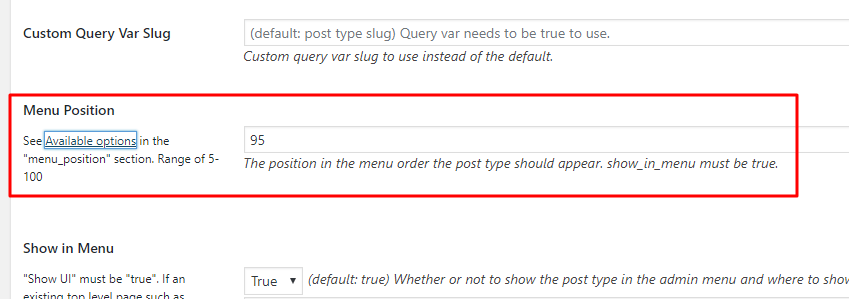
- Custom Post Type UI — Change menu position to ensure all CPTs are visible
- Jetpack — Click link for compatibility details by module.
- LeadPages — If you find your Thesis Skin Editor to be non-functional (i.e., clicking its link redirects to your home page instead of displaying the Editor), then you must deactivate the Plugin in order to use the Editor again.
- NextGEN Gallery — This Plugin will cause the WP Admin Bar to partially obscure the Thesis Skin Editor menu (but it shouldn’t be interfering with the Skin Editor at all!). The solution is to temporarily disable the plugin until you’ve finished editing your Skin.
- SlideDeck 2 — Plugin includes codemirror JS that conflicts with the Custom CSS editor
- Thumbnail for Excerpts — [edit: link removed]
- W3 Total Cache — You must disable object caching and “HTML & XML” minification.
- WP Minify — You must disable “HTML Minification”.
- Yoast SEO — Click link for specific compatibility details.
Plugins with conflicts: Do not use!
- Lizatom Shortcodes — Substitutes its own version of the CodeMirror JS and CSS files for their Thesis counterparts, which breaks the Custom CSS Editor.
- Triberr — Substitutes its own version of the comments template, with conflicts with the Thesis version.
- Use Google Libraries — Improperly queues up JS in the WordPress dashboard and causes conflicts with other plugins or themes that need to run JS.
- Ultimate Learning Pro — Template loader relies on
single_templatefilter and is not robust enough to be activated in a different manner.
Fully compatible Plugins
Plugins listed here may have had compatibility issues in the past but are now fully compatible with Thesis.
- Disqus
- OptimizePress
- Subscribe to Comments Reloaded
- Thrive Comments
- Wishlist Member
- WooCommerce