Thesis gives you an unprecedented amount of control from the comfort of the WordPress Admin, but certain customizations may still require the use of PHP code.
You have two main avenues for PHP customizations—hooks and filters:
- hooks — “I want to output something new in a specific location.”
- filters — “I’d like to change something that’s already being output.”
We’ll start by looking at hooks, which are the most powerful way to establish programmatic control over your website.
Thesis Hook Syntax
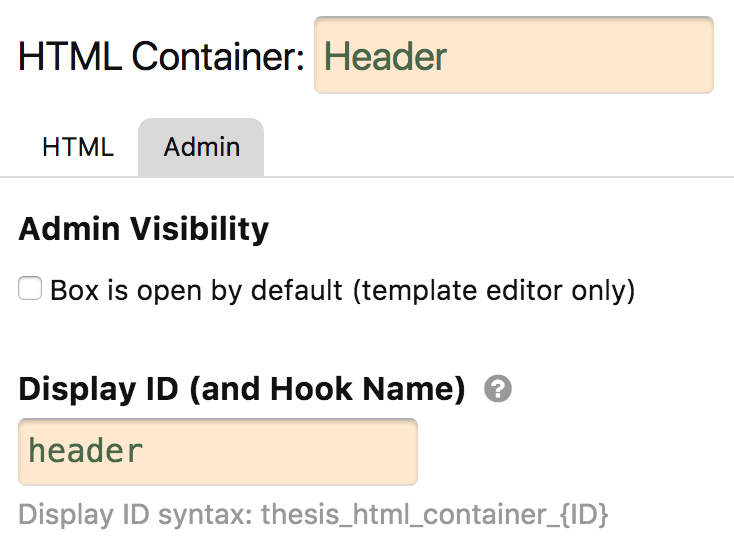 Thesis provides built-in hook locations on HTML Containers and other specialty Boxes like Post Boxes and Query Boxes.
To “activate” hooks for use on a Box, specify a Display ID on the Admin tab within the Skin Editor.
Pro tip: Display ID names have already been provided on all official Thesis Skins from DIYthemes.
Each HTML Container has 4 built-in hook locations with the following syntax (where $hook is the Display ID you’ve given to this Box):
hook_before_$hookhook_top_$hookhook_bottom_$hookhook_after_$hook
Notice how the hook syntax follows a simple, predictable formula:
hook_[location]_[unique name]
Also notice the 4 default hook locations:
before— before the opening HTML tagtop— after the opening HTML tagbottom— before the closing HTML tagafter— after the closing HTML tag
In addition to the above hooks, Thesis adds two other hooks to every page:
hook_top_body— after the opening<body>taghook_bottom_body— before the closing</body>tag
Of course, Thesis also includes the two standard WordPress Theme hooks—wp_head and wp_footer—on every page.
Where to Put Your Custom PHP Code
You can add custom PHP code to Thesis in two smart locations:
/wp-content/thesis/skins/skin-name/custom.phpYour Skin’s
custom.phpfile; code you put in this file will only affect this particular Skin./wp-content/thesis/master.phpYour Thesis master PHP file; code you put in this file will affect every Skin on your Thesis installation.
Pro tip: You’ll need an FTP client to access these files, and you’ll need a text editor to edit them.
Code Example: How to Use Thesis Hooks
To illustrate how you might use the Thesis hook system, let’s add some welcome text to the top of each page on a Thesis-powered website.
As we saw above, Thesis adds two hooks to every page of your site—hook_top_body and hook_bottom_body. In this case, we’ll use hook_top_body to output a nice message at the top of the page.
Note: Your Thesis Skin adds a slew of other hooks to each template. Check out the Thesis hook sniffer to see all available hooks on your templates.
add_action('hook_top_body', 'welcome_text');

function welcome_text() {
	echo "<p>Welcome, and happy ", date('l'), "!</p>\n";
}
With this custom code in place, visitors to your site will see a welcome message like this:
“Welcome, and happy Wednesday!”
How to Declare Hooks in Your Own Code
If you develop your own Skins and Boxes, you may wish to declare your own hooks at some point. The most powerful way to do this is by leveraging the Thesis API hook system.
To illustrate how this works, let’s say you’d like to declare a hook called my_banner_ad somewhere in your code. Here’s what that would look like with the Thesis API hook system:
global $thesis; // We must access the Thesis object first
$thesis->api->hook('my_banner_ad');
The Thesis API hook system invokes the WordPress do_action system, but it allows for hook sniffing and intelligent event detection. Because of this additional power, we recommend using the Thesis API hook system whenever you declare your own hooks.
Hook Sniffing
Thesis includes a special “hook sniffer” that enables you to see all the hooks running on a particular template (and thus any page of your website).
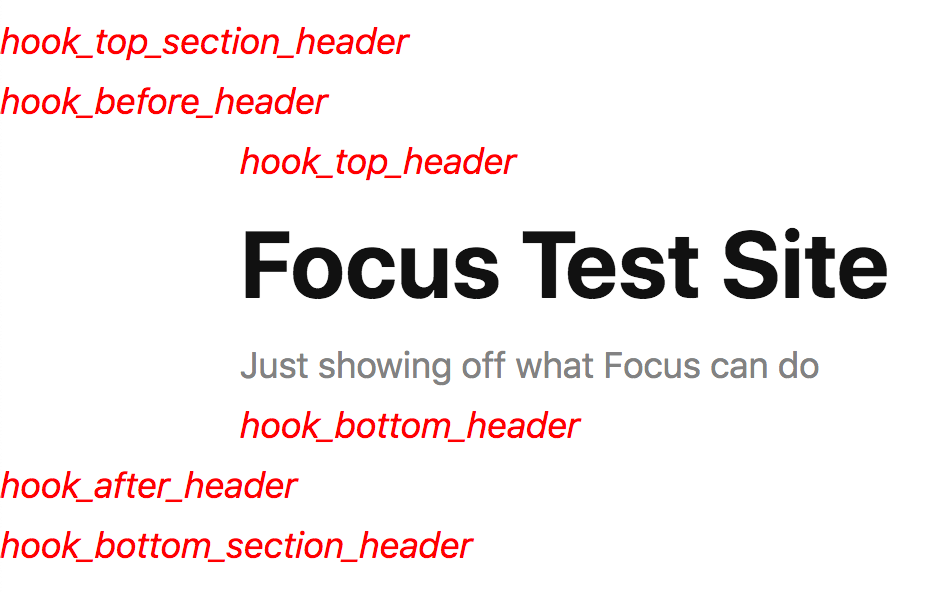
Hook names appear in red in their precise locations!
This is an incredibly handy tool for developers, and you can activate it with a single line of code in your master.php or custom.php file:
add_filter('thesis_hooks', '__return_true');
After activating the hook sniffer, logged-in admin users only will be able to view the available hooks on any page of your website (regular website visitors will not see them).
Customizing with Filters
Filters enable you to change output or functionality. There are 4 basic types of filters:
- boolean — simple on/off switches
- string — text
- array — data that governs functionality
- hybrid — a combination of boolean + (string or array)
Unlike hooks, which can echo output, filters can only return output. In other words, filters enable you to tell Thesis (or WordPress) to “do this instead.”
Boolean Filters
Pure boolean filters can only have two values—on or off. If a boolean filter is off by default, here’s how to turn it on:
add_filter('example_boolean_filter', '__return_true');
And if a boolean filter is on by default, here’s how to turn it off:
add_filter('example_boolean_filter', '__return_false');
String Filters
String filters enable you to replace text that either governs behavior or gets output on a web page. Here’s how they work:
add_filter('example_string_filter', 'my_string_filter');

function my_string_filter($original) {
	return 'Something else';
}
Unlike simple boolean filters, string filters require the presence of an actual function to return new or modified output.
As a result, all string filters will feature 2-part constructions like you see here—a basic add_filter() call followed by a custom function that performs the modification.
Array Filters
Array filters enable you to change functionality that relies upon multiple pieces of information. The idea is you start with default information (a default array), and then you add new information that changes, augments, or enhances functionality in some way:
add_filter('example_array_filter', 'my_array_filter');

function my_array_filter($original) {
	$original['new_item_1'] = 'whatever';
	$original['new_item_2'] = 'something else';
	return $original;
}
When used properly, array filters are handy because they preserve original functionality while still providing you with a convenient way to incorporate custom functionality.
Hybrid Filters
Hybrid filters consist of a boolean component and a string/array component. Typically, the boolean component is used to turn off functionality, and the string/array component is used to extend or modify functionality.
// Turn off functionality with boolean component
add_filter('example_hybrid_filter', '__return_false');

// Extend functionality with string/array component
add_filter('example_hybrid_filter', 'my_hybrid_filter');

function my_hybrid_filter($original) {
	return 'A new string';
}