Login

Everything You Need to Know About Thesis 1.0

by Chris Pearson

Many of you have already gotten a first-hand look at the new options panel in Thesis 1.0, but there are tons of other improvements that I’m sure you’ll be interested in as well. I’ll reference the options panel throughout this article, but my primary goal here is to address some of the lesser-known bits of goodness in this new release.

Robust Multimedia Box Options

In version 0.3, the multimedia box allowed users to choose between rotating images and embedded video, but customizing the thing involved a fair amount of code-wrangling. I hate forcing users to enter a coding environment that they may not be comfortable with, and as a result, I focused on creating flexible, easy-to-use options to control the multimedia box.

Thesis 1.0 allows you to utilize the multimedia box area in a variety of ways. You can:

  • Use the new, automated image rotator
  • Embed a video
  • Embed custom code
  • Disable the box by default
  • Override the default settings and display an image, video, or code on individual posts and pages via the use of custom fields!

Best of all, you can control these settings from within the WordPress dashboard and on the post/page editing screens—no coding is required!

Smart Image Rotation

If you intend to use the image rotator in the multimedia box area, you’re going to love the improvements to this part of the theme. All you have to do is load up the /rotator folder with the images you want to use, and Thesis will handle everything else for you.
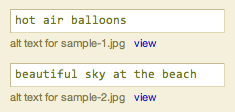
Image alt tag options

The real hidden beauty here is all of the stuff Thesis does with your images. First, the theme will automatically discover your new images and add them to the rotation roster. Next, it will check the size of the image, and if it is a standard aspect ratio, Thesis will assign the appropriate size class to the image. Finally, if you’ve supplied an alt tag in the options panel (as shown in the image), the theme will add that to the resulting img tag output.

Oh, and for the record, the Thesis image rotator plays quite nicely with images that fit the most common aspect ratios, including:

  • 3×2
  • 2×3
  • 4×3
  • 16×9
  • 4×5

One of the hottest support topics with prior versions of Thesis was the navigation menu, and hopefully, the custom nav menu builder in the new options panel will bring some method to the madness. You can add any of your site’s Pages, any category archive page, and any external link that you like to the menu, and you can do it all from within the Thesis options panel. Best of all, the interface is extremely simple, so even the biggest n00b can create a killer navigation menu without having to touch a bit of code!

Completely New File Structure

Thesis 1.0 is considerably smarter than its predecessors, and in order to achieve some of the new functionality, I had to organize theme files and folders a little differently. The most notable change is the consolidation of all user-customized files into a single folder called /custom. Your custom stylesheet, custom.css, is now located inside this folder, and those of you who are upgrading from version 0.3 will need to place your custom stylesheet in this new location.

The /custom folder also contains a user-defined functions file called custom_functions.php. The default file consists of one example function, and its use is based on an article I published about custom functions. Any functions you define in that file will be available for use within the theme’s template files, so the savvy tweakers among you can use that file to accomplish pretty much anything you like.

The final addition to the /custom folder is an /images folder that is intended to house all of your graphical customizations. In your custom stylesheet, you might be accustomed to referring to a background image like so:

body.custom { background: url('images/sample-custom-graphic.gif'); }

The addition of the /images folder preserves filename references like the one used above, and in my opinion, this is an easy, semantically-meaningful way of constructing your custom CSS. Oh, and I suppose it’s worth noting that because this new folder structure consolidates all of your customizations into one location, updates ought to be even easier in the future (specifically, dealing with images will be less of a hassle).

On another note, I’ve omitted a few template files, including:

  • nav_menu.php
  • nav_menu_items.php
  • navigation.php
  • rotating_images.php
  • video_box.php

These files performed roles that are now handled by more robust PHP functions, and as a result, they no longer have a place in the template core.

World’s Easiest RSS Feed Management

In the past, proper setup of your RSS feed typically required the use of a third-party plugin. Also, in prior versions of Thesis, you had to do a tiny bit of code-wrangling to get your feed set up correctly. Now, with Thesis 1.0, all you have to do is drop your feed address in an options box, and boom—instant RSS goodness. Setting up feeds literally cannot get any easier than this.

Simple Stats and Scripts Management

Do you use statistics tracking programs like Mint or Google Analytics? If so, then tell me if this sounds familiar—you upgrade or change your theme, and two days later, you realize you left out the stinkin’ tracking code!

Don’t worry, we’ve all done it! Fortunately, if you’re using Thesis 1.0, you’re never going to have to deal with that again. Once you’ve added your tracking codes to the options panel, Thesis will insert them into the appropriate locations in the markup, and you won’t have to lift a finger!

Are you sensing a trend here? Less coding, more results! It’s the Thesis mantra, I’m tellin’ ya.

With each new release of WordPress, the sidebar Widget control interface becomes more and more useful. Moving forward, one of my primary goals is to achieve total sidebar control from within the Widget interface in the WordPress dashboard, and although we’re not quite there yet, Thesis 1.0 represents a big step in that direction.
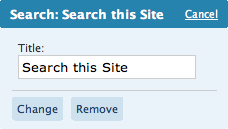
Thesis search widget

One of the most noteworthy changes is the fact that I’ve done away with the default Thesis search code. But don’t fret—you can still access it from the Widget control panel, and unlike the default WordPress search widget, you have the option to add a title to this one.

Another noteworthy sidebar addition is the Google Custom Search widget, which will allow you to integrate Google Custom Search without having to do any coding whatsoever. All you have to do is add a title and drop your GCSE code in the designated box, and boom—instant Google Search widgetry on your site!

Finally, I wrote a clever little function that you can use to list any number of recent posts from any category in a special sidebar widget. Although you’ll have to edit one of your sidebar files to take advantage of this, I think you’ll find the process to be pretty simple. For instance, if you want to place the 8 most recent posts from your “Popular” category in a sidebar widget titled “Popular Posts,” you can get the job done with this handy function:

thesis_recent_posts_widget('Popular', 'Popular Posts', 8);

The function, thesis_recent_posts_widget(), accepts three parameters. The first (Popular from the above snippet) is the category slug of the category you want to target. The second (Popular Posts) is whatever you want the title of your resulting widget to be. The third parameter (8) is optional, and it represents the number of posts you want to display. The default value is 5, so if you were to use the following code in either of your sidebar template files:

thesis_recent_posts_widget('Popular', 'Popular Posts');

You would end up with 5 posts from the Popular category in a widget titled “Popular Posts.” Oh, and for the record, this is the exact function I use to generate the “Customization Tips” and “Thesis News” widgets you see in the sidebar of this site. Cool, eh?

Markup and Style Changes

Admittedly, I’m an irrepressible tweaker, and I couldn’t help but change a few stylistic elements of the theme while working on this new version. First, I decided to serve the sidebar headings inside <h3> tags instead of the semantically questionable <h2> tags that were found in previous releases. In addition, I decided to style the sidebar headings differently, opting for small-caps and removing the horizontal borders that resided above and below the text. Those horizontal lines were killin’ the chi in the sidebar, so that’s why I felt it was necessary to remove them.

Also, the keen observers among you will notice that I removed the bullets from list items in the sidebar. The bullets pushed the text over to the right a few pixels, and that, in turn, created a horizontal interruption of the natural rhythm of text in the sidebars. Essentially, all of the sidebar treatments I implemented both simplified and minimized the design on that part of the theme, and as an added benefit, this will make future modifications easier and more efficient to produce.

The next major stylistic change concerns post and page titles. In previous versions, they were served in bold Georgia, but the reasoning behind that was, in my opinion, poor at best. The leading (or line-height in CSS terms) in the content area is 22px, and in order to maintain this leading, I chose a font size of 20px for the titles. This decision allowed me to set a 22px line height and keep multi-line titles from looking awkward, but unfortunately, I always felt that the content area called for larger fonts on the titles.

To compensate, I elected to serve the titles in bold, but the resulting “heaviness” still clashed with the bold site title in the header. On top of all this, I simply don’t like serving post titles in bold Georgia—something about it just doesn’t seem right to me (probably because bold Georgia is just really freakin’ bold).

Ultimately, I decided that maintaining the established leading was neither necessary nor important in the title area. As a result, I increased both the size and the leading of post and page titles in Thesis 1.0, and in addition, I removed the default bold state.

Finally, I reworked a bunch of the CSS that governs the width of the various elements of the theme. Now, you are only a few lines of custom CSS away from different layout widths (like a wider content area, for instance). Even better, this new setup makes it much easier for me to provide tutorials and helpful tips for simple layout width changes!

Microformats Galore

Microformats are an essential piece of the Web standards movement, primarily because they provide predictable, patternized ways of serving markup. In practice, this means that sites featuring robust microformats are going to be as accessible as possible to emerging Web technologies.

What does this mean for you? Ultimately, you want to do everything you can to position yourself for success in the future, and microformats are one area where you can gain some leverage. Simply put, incorporating microformats is a good idea, and that’s why I felt that it was essential to include them in Thesis. The theme is ready for the road ahead, and that kind of peace of mind is often worth the price of admission.

For those of you who are curious about the specifics, Thesis now makes extensive use of the hAtom microformat on post and index pages. Future theme updates will also feature hCard integration in both the post and comment author fields.

Separation of Comments and Trackbacks

Instead of appearing inline with comments, trackbacks will now be generated in a concise, easy-to-read list above the comments. If no trackbacks have been posted, this area simply will not appear, and you’ll see the list of comments just as you would normally expect.

In addition, I focused on tightening up the display behavior surrounding comments and comment status, so you should see marked improvement in those areas as you use the theme. In prior Thesis versions, users noticed some janky behavior when comments were turned off on individual posts (especially after being on). Thesis 1.0 features a much more elegant way of handling these different status scenarios, and now the theme knows how to respond in each unique situation.

Page-specific Classes

When you create a Page in 1.0, Thesis will automatically add the URL slug to the #content div. The idea here is that it will allow you to apply unique custom styles to any Page of your site.

To illustrate, let’s look at a fictitious “About” page that has the slug about. On this example page, the #content div will render like this:

<div id="content" class="about">

Now, if you want to change the link color on the About page only (in this case, to red), you can add the following CSS to your custom stylesheet:

.custom .about .format_text a { color: #c00; }

In theory, you can do some pretty radical modifications on a per-page basis by using this technique, and I’m sure the ambitious among you will come up with some pretty killer implementations!

In every theme I’ve ever created, the previous and next links that appear on paginated index pages have driven me nuts. Even when there were no more posts to show, some of the markup from the previous/next navigation would render, and this usually resulted in a random horizontal line or gray box appearing at the bottom of the post list.

Thanks to a little code-scrubbing, this is no longer the case. From now on, if there are no more posts to show, you won’t see any random gray lines or empty boxes. Anal-retentive theme users rejoice!

Title and Tagline Control

With the flick of a switch in the new options panel, you can turn your site’s title and tagline on or off. Generally, it’s a good idea to leave these elements in your markup, but in certain situations, it may make more sense to ditch one or both of them. Thesis 1.0, benevolent theme that it is, now grants you that capability!

Author and Date Control on Posts and Pages
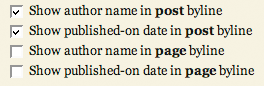
Thesis byline optionsUnder the Display Options area of the Thesis options panel, you can choose precisely how you want your bylines constructed. For those of you who are not familiar with this terminology, the byline is the line of text beneath the title of a post or page that contains the author name and the published-on date. With Thesis 1.0, you can control the bylines on both posts and pages, and if you like, you can avoid the use of bylines altogether by unchecking all of the applicable options.

Slick Tagging Control (with Microformats!)

In Thesis 1.0, you can turn tagging on or off via a simple switch in the options panel. In addition, if you choose to use tags, you can elect to link them to tag archive pages or to simply display the tags. No matter what you choose, you’ll receive the full benefit of having microformatted tags on your page; but please keep in mind that if you link to tag archive pages, you’ll be increasing the amount of indexed pages on your site unnecessarily. As a general rule, I advise against doing anything that produces “page bloat,” but you still have the option to choose either setup with Thesis.

Stylesheet Changes and Internet Explorer

There are tons of changes to the core stylesheet in 1.0, but very few of those changes actually impact the resulting styles that you see on screen. A lot of the new tweaks are more semantic than anything; for instance, post headlines (<h2>) on index pages in version 0.3 included the dotted, horizontal borders that separate the posts. In 1.0, those borders now belong to the new .post_box element, which contains all the elements from a particular post. To me, it just makes more sense to do it this way—headlines should be used for typographic purposes, not for border separations between posts.

Anyway, there are lots of other changes similar to the one I highlighted above, but they’re simply not worth diving into here.

Oh, and while testing out the theme, I noticed something in IE that I had never noticed before. Basically, under the 0.3 setup, Thesis was rendering just shy of its assigned 960px width in both IE6 and 7. As a result, embedded videos in the multimedia box would cause layouts to “break,” thereby rendering the sidebars beneath the content and to the right.

While exploring this issue, I rediscovered something that I’d completely forgotten—IE does not render decimal percentages properly from the initial font declaration, which looks like this:

body { font: 62.5% Georgia, "Times New Roman", Times, serif; }

IE sees the above font size declaration as 62% instead of 62.5%, and as a result, instead of 1em equaling 10px as designed, 1em in IE equaled 9.9375px. Spread out over 96em, that made Thesis 954px wide in IE instead of 960px, which is how wide the theme is supposed to be. Anyway, I fixed this in 1.0, so world peace should now be restored… at least on all the major browsers.

So yeah, now you guys know what I do for fun.

As far as future development goes, this is just the tip of the iceberg, folks. Subscribe to the Thesis feed, and make sure you’re along for the ride every step of the way!

Thesis users are coding less, accomplishing more, and looking better while doing it. On top of that, the value of their purchase continues to rise dramatically with each new version release. Why miss out on these benefits any longer? You should get Thesis!

{ 6 trackbacks }

A WordPress Theme for Serious Online Publishers | Copyblogger
July 15, 2008 at 11:36 am
Why I chose Thesis theme for Wordpress: the C word — Bhatnaturally
July 24, 2008 at 6:41 pm
Thesis Wordpress Theme | TheWeblogZone
July 27, 2008 at 6:03 pm
Thesis Theme for WordPress « Nuclear and Indigenous Items of Interest
August 6, 2008 at 11:53 am
Wordpress Theme Thesis | marked-to-market.de
September 6, 2008 at 2:27 pm
Thesis is live! — wienerbean.com
September 6, 2008 at 6:51 pm

{ 155 comments… read them below or add one }

christy July 15, 2008 at 2:32 pm

Thesis can’t be used on my blog…right?

Chris Pearson July 15, 2008 at 2:35 pm

christy — Unfortunately, Thesis is not available for WordPress.com blogs. If you were to switch to the self-hosted WordPress platform, you could run any theme you like.

Rian July 15, 2008 at 2:42 pm

Very NYTimes.com-ish. Nice.

Metroknow July 15, 2008 at 9:08 pm

This really looks like the solution I’ve been looking for. I just had one question – is it very difficult to customize column width to accommodate 125×125 rotating ads similar to the display on copyblogger? I like the style for blocks of ads (2 ads side by side), and would consider resizing the main and third columns to put ads in the second.

How easy is that to do/does it affect other components?

Thanks again –
Metroknow

Chris Pearson July 15, 2008 at 10:57 pm

Metroknow — The widths are all dependent on one another simply because you really don’t want to make the layout any wider than it currently is (for monitor accessibility purposes). Therefore, if you borrow from one, you should add an equivalent amount to another, and vice versa.

Thesis 1.0 features a completely reworked style setup so that you can change all the necessary widths in 4 or 5 CSS declarations. The next version release will likely contain some turkey options for widths, but no matter what, you’ll be able to use the aforementioned 4 or 5 lines of code to make your widths whatever you like at any time.

So, because of this, it really shouldn’t be that difficult to accommodate ads in the manner that you’d like. And hey—I’d be glad to work up some CSS for ya to help you out!

Metroknow July 16, 2008 at 12:40 am

Thanks Chris – your quick response is really impressive considering all the buzz surrounding this release. And I think you just made another $160 bucks for your trouble. Thanks again.

gregory July 16, 2008 at 3:05 am

can i center the main column? can i make it wider? can i convert to two column? can i put two photos side-by-side, spaced apart?

it looks like a wordpress format from fifty paces …. how can i break that look, and still have wordpress, and thesis, functionality?

Alda July 16, 2008 at 8:35 am

Many thanks for the feedback, Chris – and for taking time to look at my site. You’re absolutely right about the sandbox subdirectory (great term!) – as it happens I do have one of those, so as soon as I can carve out some time I’ll start playing around in it :) . As you point out, the upgraded Thesis does sound like a much easier platform.

Incidentally, good thinking about the video tutorials – I’m sure they could help many of us!

Aski July 17, 2008 at 6:25 am

Hi,
Is it easy to localize the thesis theme to another language like Dutch?

Andrew July 17, 2008 at 10:18 am

Hey Chris,

I’m starting a new website using wordpress.org and DreamHost hosting – I want to make sure all the initial ducks are in a row (it’s set up well for SEO, etc. etc.) before I really start adding content and promoting it.

I want to buy Thesis. Today. It looks cool and seems awesome, and your boy Brian Clark really sold me on it today (probably millions of others, too).

Anyway – if I buy the theme, is it simple enough just to upload it as a theme within my WP admin control panel? In other words, do I have to go back to the starting block with the Thesis theme, or can I just buy it, upload it, and then select it as the theme I’m using and everything will work out?

Let me know. This $167 is burning a hole in my pocket.

Kali Lilla July 18, 2008 at 10:13 am

Hey There!
In addition to Andrew’s question above, if I start with Thesis now and then want to use the magazine version that’s coming, will all my content flow into the new magazine theme when I select it? Sorry for the novice question. I’m new to WP.
:)

Andrew July 18, 2008 at 10:18 am

Duuuude. Thesis is AWESOME. It is a Must-Buy. My site is certainly in it’s infancy, but with Thesis, I foresee a bright future.

This really is the best WordPress theme around. Chris, you do awesome work. Best $167 I ever spent on something G-rated.

Chris Pearson July 18, 2008 at 11:18 am

gregory — You can modify the column widths with just a few lines (4–6) of custom CSS, and you could use this same principle to create a two-column layout as well. Also, Thesis is equipped with the as-yet-undocumented stack class, which allows two (or more) images to be placed side-by-side.

Despite the fact that all of the above can be achieved with Thesis 1.0, in my personal opinion, it’s not yet easy enough to do. I’m working on an upgrade to the options panel that will allow you to select the type of layout you want – two column, for instance – as well as the sidebar arrangement, etc. Simply put, you’ll be able to modify the layout without having to deal with code, and hopefully, that will bring a previously-unseen level of layout control to average users.

Chris Pearson July 18, 2008 at 11:37 am

Aski — Thesis 1.0 is set up for internationalization, but it needs community members to contribute specific .po files for translation into different languages.

Kali — Your content will “flow” into any and all Thesis layouts, but you will have to utilize custom fields on individual posts if you intend to make the the most of the forthcoming magazine style. You’ll be able to go back and add these fields at any time, so it should be no trouble at all.

Andrew — Heh, that’s the funniest thing I’ll read today.

gregory July 18, 2008 at 2:49 pm

thanks for your time chris, and can the main column be centered?

Chris Pearson July 18, 2008 at 3:07 pm

gregory — Not right now, but possibly in a future release.

RichlyScented July 19, 2008 at 4:36 am

Thanks Chris for such a strong, solid theme.

Great product… kudos for such a fine job!

Michael July 23, 2008 at 1:59 pm

Hello Chris,

Fantastic product, but. . . . I build Wordpress Blogs to “flip.” Can I use the developers license, or will each one of my buyers need to buy a personal license?

Chris Pearson July 24, 2008 at 12:52 pm

Michael — In that setup, your buyers would actually need licenses themselves. This is not such a bad thing, though, because with the new DIYthemes affiliate program, you can earn cash for each customer your sign up!

Ryan July 25, 2008 at 6:35 pm

Keep up the good work!

Mary July 26, 2008 at 11:06 am

Pod Casts? We use your Neoclassical Theme, but would like more flexibility in how the post pages display. (Sounds like your upcoming magazine theme might work for this) We would especially like to create a different look for Pod Cast pages – no sidebars. Is this possible using Thesis or will it be possible using you magazine theme?

Andreas July 27, 2008 at 7:04 pm

What about translating the theme to German – how can I do that easily?

Chris Pearson July 28, 2008 at 9:17 pm

Mary — With Thesis 1.0.2, you can create a custom look for particular pages through the use of the page-specific classes discussed above. In future releases, you’ll be able to customize individual posts through a similar piece of functionality.

Andreas — Thesis 1.0+ is set up for internationalization, but I suppose it would make things easier if I built a skeleton translation file. If you’re not familiar with the process, I’d encourage you to look into this further to see how it’s done.

Jerry July 30, 2008 at 6:07 pm

Hey Chris,

I come from a Joomla user’s background, where everything is modular and dead-on simple. You don’t have to know ANY code. It seems that WP isn’t that way and to make a site decent you have to know CSS, HTML, PHP (did I miss anything?) to generate great results. I just don’t have time and probably not enough brain cells to do that.

Any chance you can create an “idiot’s guide” to Thesis, in print or even better, screen-capture video, to show how to put those 4-6 lines of CSS in to do this or that, etc?

Obviously, your showcase features users who do know code or who paid somebody to make Thesis dance. I wouldn’t mind paying a good coder to customize Thesis but I would like to know how to do the easy stuff so I don’t have to yell for a coder every day to make small changes.

Anyway, it’s a beautiful theme and I’d like to use it for at least one site and probably more — but I need a smooth road to travel on this. Hope you can help. Thanks.

Eran Malloch August 1, 2008 at 2:00 am

Hi Chris,

A really nice looking theme that I am very seriously considering purchasing. The alternative is the new City theme from Revolution, but yours is slightly ahead at the moment… :-)

One question though: I really want a WP theme that has a left hand menu (ala categories & pages column), since eye tracking studies have shown that this is the primary location of the “golden triangle”…

Is there plans to modify thesis to allow us to have left hand columns (or, preferrably, 3 column, 1 left & 1 right)? I don’t particularly like the “typical” Right hand column look n feel that most blogs have. Plus, if it’s well done, a LH column makes a site look less like a blog and more like a “traditional” website…

In my case, the main reason for wanting this, aside from the top LHS being the primary spot visitor eyes go to, is that I want a place to make it easier for visitors to browse categories and find old posts, when a normal blog isn’t the easiest way to achieve this result (because often the cats/pages menu is hidden below the fold on the RHS of the page, etc).

If I had (say) 5-6 primary categories, and 50-100 posts under each, I want visitors to be easily able to look through the category page for each and see all my past posts, rather than just rely on the search function.

I’m on of those folks who prefer to use WP as a CMS rather than as a (time-based) blog, and this helps overcome the std WP weakness in this area.

Anyway, hope this comment wasn’t too long winded ;-) but definitely interested to hear your answer to this one.

regards

Eran Malloch
Perth, Western Australia

Serge August 1, 2008 at 8:08 am

Hello Chris,

I’m considering updating my blog template with either Thesis or another professional theme. But before I purchase, I’d like to ask a few questions.

1. Can I modify the left column width? I read on the forum that it will be possible or already is but I’d like to know how wide I can make that left column. I often show pictures in blogposts and they are 600 pixels wide. Is this possible in the current version?

2. Can I modify the right column width where the two sidebars are located? Can I drop a sidebar?

3. Can I change the location of the multimedia box?

4. Within a blogpost can I show the category in which I posted the article?
–> Posted by Chris Pearson on July 8, 2008 in (or filed under): “namecategory1″ and “namecategory2″ …

5. Can I add two multimedia boxes? (on for video, one for rotating images, etc.)

6. Can I rename the pages in the nav menu?

7. Is Thesis compatible with a Flickr RSS Wordpress plugin?

Thanks!

Serge

(ps: I couldn’t find a form or mail address to contact you; even in the forum I couldn’t register before purchasing the theme so I couldn’t post my questions over there! Is this a normal procedure??)

Jerry August 2, 2008 at 10:11 am

Chris,

Know you’re busy, but maybe you can get an experienced user who is part of your support team to reply to questions. A lot of time passes between question and reply.

Not complaining, but without being able to access the forum and query existing users we have no ability to come to informed decisions unless we get answers from this page. Obviously, I’m interested and it seems many more are as well.

I think I’m close to buying but, as stated in my last message to you, I will still need an experienced Thesis hand to guide me or do some work for me. That info is holding me back at present.

Thanks.

Héctor August 2, 2008 at 7:13 pm

Hi Chris,

I’m starting to play around with plugin “Slickr Gallery” I really like this plugin. There are some few themes that work already well with this plugin (I’m testing misty-look today) . Does Thesis theme work well with Slickr Gallery as well as Lightbox 2 plugins?

Thanks/Héctor

Rick Beckman August 3, 2008 at 12:29 pm

Serge: Let me see if I can answer your questions for you. I’m Chris’ official support person but I don’t always see questions here — I mostly monitor the forums. Hopefully this will talk you into getting Thesis. :)

1. Can I modify the left column width? I read on the forum that it will be possible or already is but I’d like to know how wide I can make that left column. I often show pictures in blogposts and they are 600 pixels wide. Is this possible in the current version?

That is possible with some relatively minor tweaks to the custom.css file. After your purchase, poke me on the support forums (username: KingdomGeek) and I’d be happy to whip up the solution for you.

(And speaking of the support forums, I get most users’ questions answered within 24 hours, many within just a few hours from when they are posted. Support isn’t something Thesis users have to worry about!)

2. Can I modify the right column width where the two sidebars are located? Can I drop a sidebar?

Yes. Yes. While all of this will likely be a lot easier in future versions of Thesis, it has already come up some on the forums, and again, I’d be happy to get something working for you. I just don’t want to clutter this thread with code; hope you understand. :D

3. Can I change the location of the multimedia box?

It would require some hacking of core Thesis files and altering of the relevant CSS to get it to work out, but yeah, it can be moved.

4. Within a blogpost can I show the category in which I posted the article?
–> Posted by Chris Pearson on July 8, 2008 in (or filed under): “namecategory1″ and “namecategory2″ …

That can be added in by hacking core files easily enough.

5. Can I add two multimedia boxes? (on for video, one for rotating images, etc.)

Not without even further hacking of not just core files but also likely of the functions which handle the multimedia box.

6. Can I rename the pages in the nav menu?

Absolutely.

7. Is Thesis compatible with a Flickr RSS Wordpress plugin?

It’ll display that plugin’s widget just fine, but you may need to add some custom styling to get it to look pretty — chances are, it’ll display the thumbnails in a pile without any sort of whitespace between the images.

Rick Beckman August 3, 2008 at 12:30 pm

Héctor: No reason why Thesis shouldn’t work with those plugins. A few stylistic tweaks may be necessary, but we on the support forum would be happy to help out.

Rick Beckman August 3, 2008 at 12:37 pm

Jerry: Regarding the prominence of the left-hand side, it is that very reason why Thesis has its content on the left. Your viewers are there for your content, and your site should encourage their eyes to flow directly to it. I’m not for sure how easy or feasible it would be to flip the sidebars to the other side or whether or not such will be possible in future Thesis versions. Chris has hinted at a soon-ish release date to me, but I won’t say when just in case.

Links to categories can be added very easily via WordPress widgets to Thesis’ sidebars in an above-the-fold position just underneath the multimedia box. (In my browser, anyway, that wouldn’t require any scrolling to see.)

I’d suggest reading What Every Blogger Needs to Know About Categories by Chris; he very likely coded Thesis with it in mind.

I can’t promise an attractive solution for left-hand sidebars, but I can promise we’ll do our best to make you satisfied in your purchase. If you’re convinced, get Thesis and put us to the test. :) If not, then we hope you’ll reconsider in the future!

Serge August 4, 2008 at 1:11 pm

Rick,

Thank you for the answers. I don’t have much technical knowledge concerning css and web programming so after purchasing I will certainly need your help on tweaking or “hacking” the code :-)

Rick Beckman August 4, 2008 at 1:23 pm

Serge: Then I hope that means you’ll be purchasing Thesis? If so, welcome to the family!

Rob Lawrence August 4, 2008 at 9:30 pm

I am very interested in this theme. Any idea on ETA for the new changes? Or the magazine theme? Also, can this theme be fully integrated with vBulletin? Let me know, I am very interested. Thanks!

Rick Beckman August 5, 2008 at 5:39 am

Rob: Chris may lynch me for spilling the beans, but he has hinted at a period within a month for the next version of Thesis. Whether this includes the magazine variant, I’m not sure. We’ll both be surprised. :)

At the time, any release dates are tentative, so don’t hold him to anything. :)

As for vBulletin… While I’m sure it *can* be adapted to fit vBulletin — it’d certainly be better than the horrible default vBulletin theme! — no one that I know of has done so yet.

Here’s hoping you take the plunge and get Thesis! :D

Rob Lawrence August 5, 2008 at 9:17 am

Can you explain the new menu system coming to the theme? Is it going to be a drop down style like the one on the Revolution themes? I have a lot of buttons and menu items I want to have but thesis theme seems like it might limit this due to space. Any suggestions? Can I add my own menu system to the theme, any easy way to do this?

Rick Beckman August 5, 2008 at 2:57 pm

Unfortunately, no, I can’t explain the upcoming one. Chris’ secrets are his own. :P

Thesis is set up so that a one-line header menu looks best, but I don’t think there’s any actual limit — just not sure how pretty it is when the line wraps.

That said, you can add as many buttons and links as you want to the sidebar via WordPress widgets.

Keeping the # of links in the header to a small # is a very good thing for users who may be browsing on cell phones or other limited browsers. They’ll get to your content a lot quicker if they don’t have to skip over many links.

Will August 5, 2008 at 4:00 pm

The question and answer below confuses me a bit. Maybe by flip it is meant to set up a domain and blog and then sell it whole to a third party? If so, than I guess that is different than what I have seen in answers to other questions where if you have the developers license you can be hired to develop, administer or maintain a site for a client and use Thesis and the basis for that work. Am I misunderstanding the correct use of the developers license?

Fantastic product, but. . . . I build Wordpress Blogs to “flip.” Can I use the developers license, or will each one of my buyers need to buy a personal license?
69 Chris Pearson 07.24.08 at 12:52 pm

Michael — In that setup, your buyers would actually need licenses themselves. This is not such a bad thing, though, because with the new DIYthemes affiliate program, you can earn cash for each customer your sign up!

Gregor Gable August 6, 2008 at 12:13 pm

Hi,
Wow :-}. great theme, I will be transferring my blog , to my website. At that point I can use your Theme? Right.
Kind, Regards, Gregor
Nuclear and Indigenous Items of Interest blog http://gregornot.wordpress.com/

Chris Pearson August 7, 2008 at 11:08 am

Rob — Stylistic integration with vBulletin is something that’s down the road on the development cycle, but it is certainly a base I want to cover. I wouldn’t expect anything on that front before the end of 2008, though (but you may get lucky!).

Regarding the nav menu, I will likely be breaking it up into two separate parts. One menu will be just like the nav menu now, and its purpose will be to house links to major internal pages and also links to external pages. The second menu (likely located underneath the title and above the content area of the layout) will be intended for categories, and I will eventually provide drop-down support for sub-categories.

Will — I’m not sure I understand your question completely, but the bottom line is that you cannot exploit the developer’s license in a high turnover environment. For instance, hosting companies routinely offer 1-click WordPress installations that include tons of themes. Some of these same companies want to offer Thesis to their clients, and in this case, a developer’s license would obviously not be adequate.

I interpreted Michael’s situation of “building to flip” as much less customized, hands-off type of environment. Using Thesis to help you create a standards-compliant, customized design for a client is fine; using it to sell sites at face value is not. To put it another way, if you can command a reasonable sum for a “custom design” using Thesis, then a developer’s license is fine. If you simply slap a theme up and turn over a site for something like a hundred bucks, then no—that would be exploiting the developer’s license.

Chris Pearson August 7, 2008 at 11:10 am

Gregor — As long as your new site is not on WordPress.com (in other words, if it is self-hosted), then you’ll be able to apply Thesis.

Brian August 7, 2008 at 3:35 pm

Is it ok to buy this theme and use it outside of wordpress? i.e. use the markup/css/theme on a completely separate site. Obviously I would have to modify elements of the code myself, but I was just wondering if this is allowed?

thanks,

Chris Pearson August 7, 2008 at 3:59 pm

Brian — Sure, definitely. Just out of curiosity, are you planning on porting the theme to another CMS platform?

Brian August 7, 2008 at 4:19 pm

No, I was planning on incorporating elements of it into a website that I am developing. It may or may not work out, but i’ll send you a link if it does.

thanks,

Chris Pearson August 7, 2008 at 4:27 pm

Brian — Sounds good to me.

Handig August 8, 2008 at 7:08 am

Hi,

How easy is it to implement more fancy nav menu’s with Thesis?
And can the search box be placed right next to the nav menu?

I would like something like this or this.

Max Forlani August 8, 2008 at 10:37 am

Hi,

I’m about to buy Thesis, but have a few questions which I hope you can answer before the weekend, so I can implement Thesis in the weekend:

- a silly one to start with, can I customize it into a 4-column design, with 185 px column on the far left? If you look at my current side, I would like to move the nav pane to the left, so visitors don’t only see adds and the main article above the fold?
- can the 125×125 placeholder be customized to hold 3 instead of 6 adds?
- can I implement another ‘widget’ that spans both right columns (just like the 125×125 placeholder) to create a Most Popular space (wich would be above the fold, hence bringing the 125×125 spaceholder a bit down?
- does the header has to be as high as it is in most testimonail cases, or does that depend on the background pic?
- and finally, is Thickbox possible and built-in as an image viewer?

Kind regards,
Max

Chris Pearson August 8, 2008 at 12:03 pm

Handig — As of version 1.0.2, Thesis does not include built-in support for those types of nav menus, so they would be fairly difficult to implement. As far as the search box is concerned, you’ll have a lot more placement options in future releases of the theme.

Max — Here we go, in order:

  1. By default, Thesis does not support a 4-column arrangement, and given the nature of the theme, I would advise against attempting to perform this kind of modification yourself. In addition to being difficult, it would make future upgrades an absolute nightmare.
  2. As of version 1.0.2, Thesis does not include out-of-the-box support for 125×125 ads, and the ones you’ve seen out in the wild are the product of users’ own customizations. You can find lots of info on incorporating 125×125 ads in the forums, and because you’ll be implementing this yourself, you’ll be able to serve as many ads as you like.
  3. You cannot span both sidebar columns with Thesis 1.0.2, but the next version will include a hook that will allow you to do just that.
  4. The header can be any size you like.
  5. You can incorporate any third party image viewer you like, as most do not require any sort of styling support from themes. I’ve used Lightbox, for instance, and found that it integrated seamlessly without the need for additional styles.
Max Forlani August 8, 2008 at 1:27 pm

Hi Chris,

thanks for the elaborate and quick response. This leaves me with only one question: when do you expect to release version 1.02?

Cheers,
Max

Chris Pearson August 8, 2008 at 1:30 pm

Max — The next version of Thesis will be 1.1, and I hope to release it within the next couple of weeks.

Leave a Comment

Previous post: Thesis 1.0 is Available Now!

Next post: Grab Thesis 1.0.1 for WordPress 2.6 Compatibility