Login ↓

Everything You Need to Know About Thesis 1.0

by Chris Pearson on July 8, 2008

Many of you have already gotten a first-hand look at the new options panel in Thesis 1.0, but there are tons of other improvements that I’m sure you’ll be interested in as well. I’ll reference the options panel throughout this article, but my primary goal here is to address some of the lesser-known bits of goodness in this new release.

Robust Multimedia Box Options

In version 0.3, the multimedia box allowed users to choose between rotating images and embedded video, but customizing the thing involved a fair amount of code-wrangling. I hate forcing users to enter a coding environment that they may not be comfortable with, and as a result, I focused on creating flexible, easy-to-use options to control the multimedia box.

Thesis 1.0 allows you to utilize the multimedia box area in a variety of ways. You can:

  • Use the new, automated image rotator
  • Embed a video
  • Embed custom code
  • Disable the box by default
  • Override the default settings and display an image, video, or code on individual posts and pages via the use of custom fields!

Best of all, you can control these settings from within the WordPress dashboard and on the post/page editing screens—no coding is required!

Smart Image Rotation

If you intend to use the image rotator in the multimedia box area, you’re going to love the improvements to this part of the theme. All you have to do is load up the /rotator folder with the images you want to use, and Thesis will handle everything else for you.
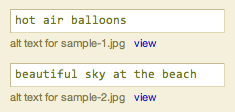
Image alt tag options

The real hidden beauty here is all of the stuff Thesis does with your images. First, the theme will automatically discover your new images and add them to the rotation roster. Next, it will check the size of the image, and if it is a standard aspect ratio, Thesis will assign the appropriate size class to the image. Finally, if you’ve supplied an alt tag in the options panel (as shown in the image), the theme will add that to the resulting img tag output.

Oh, and for the record, the Thesis image rotator plays quite nicely with images that fit the most common aspect ratios, including:

  • 3×2
  • 2×3
  • 4×3
  • 16×9
  • 4×5

One of the hottest support topics with prior versions of Thesis was the navigation menu, and hopefully, the custom nav menu builder in the new options panel will bring some method to the madness. You can add any of your site’s Pages, any category archive page, and any external link that you like to the menu, and you can do it all from within the Thesis options panel. Best of all, the interface is extremely simple, so even the biggest n00b can create a killer navigation menu without having to touch a bit of code!

Completely New File Structure

Thesis 1.0 is considerably smarter than its predecessors, and in order to achieve some of the new functionality, I had to organize theme files and folders a little differently. The most notable change is the consolidation of all user-customized files into a single folder called /custom. Your custom stylesheet, custom.css, is now located inside this folder, and those of you who are upgrading from version 0.3 will need to place your custom stylesheet in this new location.

The /custom folder also contains a user-defined functions file called custom_functions.php. The default file consists of one example function, and its use is based on an article I published about custom functions. Any functions you define in that file will be available for use within the theme’s template files, so the savvy tweakers among you can use that file to accomplish pretty much anything you like.

The final addition to the /custom folder is an /images folder that is intended to house all of your graphical customizations. In your custom stylesheet, you might be accustomed to referring to a background image like so:

body.custom { background: url('images/sample-custom-graphic.gif'); }

The addition of the /images folder preserves filename references like the one used above, and in my opinion, this is an easy, semantically-meaningful way of constructing your custom CSS. Oh, and I suppose it’s worth noting that because this new folder structure consolidates all of your customizations into one location, updates ought to be even easier in the future (specifically, dealing with images will be less of a hassle).

On another note, I’ve omitted a few template files, including:

  • nav_menu.php
  • nav_menu_items.php
  • navigation.php
  • rotating_images.php
  • video_box.php

These files performed roles that are now handled by more robust PHP functions, and as a result, they no longer have a place in the template core.

World’s Easiest RSS Feed Management

In the past, proper setup of your RSS feed typically required the use of a third-party plugin. Also, in prior versions of Thesis, you had to do a tiny bit of code-wrangling to get your feed set up correctly. Now, with Thesis 1.0, all you have to do is drop your feed address in an options box, and boom—instant RSS goodness. Setting up feeds literally cannot get any easier than this.

Simple Stats and Scripts Management

Do you use statistics tracking programs like Mint or Google Analytics? If so, then tell me if this sounds familiar—you upgrade or change your theme, and two days later, you realize you left out the stinkin’ tracking code!

Don’t worry, we’ve all done it! Fortunately, if you’re using Thesis 1.0, you’re never going to have to deal with that again. Once you’ve added your tracking codes to the options panel, Thesis will insert them into the appropriate locations in the markup, and you won’t have to lift a finger!

Are you sensing a trend here? Less coding, more results! It’s the Thesis mantra, I’m tellin’ ya.

With each new release of WordPress, the sidebar Widget control interface becomes more and more useful. Moving forward, one of my primary goals is to achieve total sidebar control from within the Widget interface in the WordPress dashboard, and although we’re not quite there yet, Thesis 1.0 represents a big step in that direction.
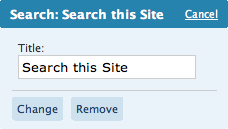
Thesis search widget

One of the most noteworthy changes is the fact that I’ve done away with the default Thesis search code. But don’t fret—you can still access it from the Widget control panel, and unlike the default WordPress search widget, you have the option to add a title to this one.

Another noteworthy sidebar addition is the Google Custom Search widget, which will allow you to integrate Google Custom Search without having to do any coding whatsoever. All you have to do is add a title and drop your GCSE code in the designated box, and boom—instant Google Search widgetry on your site!

Finally, I wrote a clever little function that you can use to list any number of recent posts from any category in a special sidebar widget. Although you’ll have to edit one of your sidebar files to take advantage of this, I think you’ll find the process to be pretty simple. For instance, if you want to place the 8 most recent posts from your “Popular” category in a sidebar widget titled “Popular Posts,” you can get the job done with this handy function:

thesis_recent_posts_widget('Popular', 'Popular Posts', 8);

The function, thesis_recent_posts_widget(), accepts three parameters. The first (Popular from the above snippet) is the category slug of the category you want to target. The second (Popular Posts) is whatever you want the title of your resulting widget to be. The third parameter (8) is optional, and it represents the number of posts you want to display. The default value is 5, so if you were to use the following code in either of your sidebar template files:

thesis_recent_posts_widget('Popular', 'Popular Posts');

You would end up with 5 posts from the Popular category in a widget titled “Popular Posts.” Oh, and for the record, this is the exact function I use to generate the “Customization Tips” and “Thesis News” widgets you see in the sidebar of this site. Cool, eh?

Markup and Style Changes

Admittedly, I’m an irrepressible tweaker, and I couldn’t help but change a few stylistic elements of the theme while working on this new version. First, I decided to serve the sidebar headings inside <h3> tags instead of the semantically questionable <h2> tags that were found in previous releases. In addition, I decided to style the sidebar headings differently, opting for small-caps and removing the horizontal borders that resided above and below the text. Those horizontal lines were killin’ the chi in the sidebar, so that’s why I felt it was necessary to remove them.

Also, the keen observers among you will notice that I removed the bullets from list items in the sidebar. The bullets pushed the text over to the right a few pixels, and that, in turn, created a horizontal interruption of the natural rhythm of text in the sidebars. Essentially, all of the sidebar treatments I implemented both simplified and minimized the design on that part of the theme, and as an added benefit, this will make future modifications easier and more efficient to produce.

The next major stylistic change concerns post and page titles. In previous versions, they were served in bold Georgia, but the reasoning behind that was, in my opinion, poor at best. The leading (or line-height in CSS terms) in the content area is 22px, and in order to maintain this leading, I chose a font size of 20px for the titles. This decision allowed me to set a 22px line height and keep multi-line titles from looking awkward, but unfortunately, I always felt that the content area called for larger fonts on the titles.

To compensate, I elected to serve the titles in bold, but the resulting “heaviness” still clashed with the bold site title in the header. On top of all this, I simply don’t like serving post titles in bold Georgia—something about it just doesn’t seem right to me (probably because bold Georgia is just really freakin’ bold).

Ultimately, I decided that maintaining the established leading was neither necessary nor important in the title area. As a result, I increased both the size and the leading of post and page titles in Thesis 1.0, and in addition, I removed the default bold state.

Finally, I reworked a bunch of the CSS that governs the width of the various elements of the theme. Now, you are only a few lines of custom CSS away from different layout widths (like a wider content area, for instance). Even better, this new setup makes it much easier for me to provide tutorials and helpful tips for simple layout width changes!

Microformats Galore

Microformats are an essential piece of the Web standards movement, primarily because they provide predictable, patternized ways of serving markup. In practice, this means that sites featuring robust microformats are going to be as accessible as possible to emerging Web technologies.

What does this mean for you? Ultimately, you want to do everything you can to position yourself for success in the future, and microformats are one area where you can gain some leverage. Simply put, incorporating microformats is a good idea, and that’s why I felt that it was essential to include them in Thesis. The theme is ready for the road ahead, and that kind of peace of mind is often worth the price of admission.

For those of you who are curious about the specifics, Thesis now makes extensive use of the hAtom microformat on post and index pages. Future theme updates will also feature hCard integration in both the post and comment author fields.

Separation of Comments and Trackbacks

Instead of appearing inline with comments, trackbacks will now be generated in a concise, easy-to-read list above the comments. If no trackbacks have been posted, this area simply will not appear, and you’ll see the list of comments just as you would normally expect.

In addition, I focused on tightening up the display behavior surrounding comments and comment status, so you should see marked improvement in those areas as you use the theme. In prior Thesis versions, users noticed some janky behavior when comments were turned off on individual posts (especially after being on). Thesis 1.0 features a much more elegant way of handling these different status scenarios, and now the theme knows how to respond in each unique situation.

Page-specific Classes

When you create a Page in 1.0, Thesis will automatically add the URL slug to the #content div. The idea here is that it will allow you to apply unique custom styles to any Page of your site.

To illustrate, let’s look at a fictitious “About” page that has the slug about. On this example page, the #content div will render like this:

<div id="content" class="about">

Now, if you want to change the link color on the About page only (in this case, to red), you can add the following CSS to your custom stylesheet:

.custom .about .format_text a { color: #c00; }

In theory, you can do some pretty radical modifications on a per-page basis by using this technique, and I’m sure the ambitious among you will come up with some pretty killer implementations!

In every theme I’ve ever created, the previous and next links that appear on paginated index pages have driven me nuts. Even when there were no more posts to show, some of the markup from the previous/next navigation would render, and this usually resulted in a random horizontal line or gray box appearing at the bottom of the post list.

Thanks to a little code-scrubbing, this is no longer the case. From now on, if there are no more posts to show, you won’t see any random gray lines or empty boxes. Anal-retentive theme users rejoice!

Title and Tagline Control

With the flick of a switch in the new options panel, you can turn your site’s title and tagline on or off. Generally, it’s a good idea to leave these elements in your markup, but in certain situations, it may make more sense to ditch one or both of them. Thesis 1.0, benevolent theme that it is, now grants you that capability!

Author and Date Control on Posts and Pages
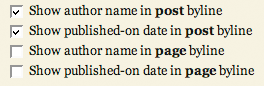
Thesis byline optionsUnder the Display Options area of the Thesis options panel, you can choose precisely how you want your bylines constructed. For those of you who are not familiar with this terminology, the byline is the line of text beneath the title of a post or page that contains the author name and the published-on date. With Thesis 1.0, you can control the bylines on both posts and pages, and if you like, you can avoid the use of bylines altogether by unchecking all of the applicable options.

Slick Tagging Control (with Microformats!)

In Thesis 1.0, you can turn tagging on or off via a simple switch in the options panel. In addition, if you choose to use tags, you can elect to link them to tag archive pages or to simply display the tags. No matter what you choose, you’ll receive the full benefit of having microformatted tags on your page; but please keep in mind that if you link to tag archive pages, you’ll be increasing the amount of indexed pages on your site unnecessarily. As a general rule, I advise against doing anything that produces “page bloat,” but you still have the option to choose either setup with Thesis.

Stylesheet Changes and Internet Explorer

There are tons of changes to the core stylesheet in 1.0, but very few of those changes actually impact the resulting styles that you see on screen. A lot of the new tweaks are more semantic than anything; for instance, post headlines (<h2>) on index pages in version 0.3 included the dotted, horizontal borders that separate the posts. In 1.0, those borders now belong to the new .post_box element, which contains all the elements from a particular post. To me, it just makes more sense to do it this way—headlines should be used for typographic purposes, not for border separations between posts.

Anyway, there are lots of other changes similar to the one I highlighted above, but they’re simply not worth diving into here.

Oh, and while testing out the theme, I noticed something in IE that I had never noticed before. Basically, under the 0.3 setup, Thesis was rendering just shy of its assigned 960px width in both IE6 and 7. As a result, embedded videos in the multimedia box would cause layouts to “break,” thereby rendering the sidebars beneath the content and to the right.

While exploring this issue, I rediscovered something that I’d completely forgotten—IE does not render decimal percentages properly from the initial font declaration, which looks like this:

body { font: 62.5% Georgia, "Times New Roman", Times, serif; }

IE sees the above font size declaration as 62% instead of 62.5%, and as a result, instead of 1em equaling 10px as designed, 1em in IE equaled 9.9375px. Spread out over 96em, that made Thesis 954px wide in IE instead of 960px, which is how wide the theme is supposed to be. Anyway, I fixed this in 1.0, so world peace should now be restored… at least on all the major browsers.

So yeah, now you guys know what I do for fun.

As far as future development goes, this is just the tip of the iceberg, folks. Subscribe to the Thesis feed, and make sure you’re along for the ride every step of the way!

Thesis users are coding less, accomplishing more, and looking better while doing it. On top of that, the value of their purchase continues to rise dramatically with each new version release. Why miss out on these benefits any longer? You should get Thesis!

{ 6 trackbacks }

A WordPress Theme for Serious Online Publishers | Copyblogger
July 15, 2008 at 11:36 am
Why I chose Thesis theme for Wordpress: the C word — Bhatnaturally
July 24, 2008 at 6:41 pm
Thesis Wordpress Theme | TheWeblogZone
July 27, 2008 at 6:03 pm
Thesis Theme for WordPress « Nuclear and Indigenous Items of Interest
August 6, 2008 at 11:53 am
Wordpress Theme Thesis | marked-to-market.de
September 6, 2008 at 2:27 pm
Thesis is live! — wienerbean.com
September 6, 2008 at 6:51 pm

{ 144 comments… read them below or add one }

Aseem Kishore August 8, 2008 at 4:27 pm

This may be a stupid question, but can I choose how many sidebars I want in the Options panel? Instead of two, just one and the content area will automatically grow to fill the empty space?

Thanks

Chris Pearson August 8, 2008 at 4:36 pm

Aseem — You can’t do it in 1.0.2, but you’ll be able to do it in 1.1. The behavior will be a little different than you’ve described, though, simply because the content column won’t grow to fill the empty space. Instead, the entire layout will become skinnier, but you’ll still be able to select the width of the content column if you want to make that a little bit wider.

Aseem Kishore August 8, 2008 at 4:43 pm

That’s great! I’ll be waiting for 1.1 before buying because I definitely need that functionality. And I’m guessing the sidebar width can also be adjusted?

Also, this is more of a feature request, but is it possible to throw in the option of placing a dom tab into the sidebar using widgets? dom tabs are so useful in terms of saving space and since it’s open source code, it would be VERY cool if that could somehow be an option in Thesis!

Secondly, another fabulous feature would be to integrate some kind of functionality that I can drop any code I want into a box and then tell it where to display on my post, i.e. top left, middle, bottom, etc. So I can just paste some Adsense code and tell it where to display. I know there are plugins that can do this, but since Thesis is taking care of so much already, it would be freakin awesome if it that was built in too!

Aseem Kishore August 9, 2008 at 2:57 pm

Is there an option to not show then entire post in Category and Archives view? If I only want to show only the first few lines of the post, is that possible? Also for the home page?

Chris Pearson August 9, 2008 at 3:19 pm

Aseem — Yes, the sidebar widths will also be adjustable in Thesis 1.1. Also, I completely agree that the multimedia box would be a great place for a dom tab selector like you’ve described, and that’s going to make its way into a future release for sure. I can’t guarantee that it’ll make 1.1, but it will debut shortly thereafter at the very least.

Regarding post insertion points, Thesis 1.1 will include no fewer than two hooks that will allow for insertion both above and below your posts. I’m working on a nicer way of implementing these, though, as custom fields are doable but not necessarily ideal. Also, your idea about placing AdSense in the middle of posts is intriguing—I’ll definitely tinker with this and see what I can come up with.

Finally, in response to your question from comment #104, you cannot choose your views on archive pages in Thesis 1.0.2; however, in 1.1, you’ll be able to choose to serve titles and bylines instead of entire posts, as this is desirable from both a usability and optimization standpoint. In addition, you’ll be able to serve excerpts if you like.

Regarding the home page, I’m leaving control of that up to you. Personally, I think using true excerpts (with the_excerpt()) on the home page is a poor choice. Instead, I recommend using the <--more--> tag to create “teasers.” This results in output similar to the excerpt, except that it’s styled much nicer.

Aseem Kishore August 9, 2008 at 4:44 pm

Chris, that is simply wonderful. I would pay $200 for a theme with all of those features! I’m really excited about 1.1.

I have one more question for you…sorry for suggesting features in the comments, but since I don’t own the theme yet, I could not post in the forums.

Anyway, can you place an option so that when you click on a category, instead of just displaying each post one after the other and then paging the rest of the posts out (which is the typcial way in Wordpress) to instead also allow you to simply have one page that has links to all the posts in that category. Maybe another category page template.

I’ve learned this is actually way better because the normal way of paging in Wordpress means that after the first few pages, i.e. \category\page2, the PageRank juice does not get passed on.

However, if you click on a category and get a listing of ALL the posts in the category on one page, then the PR is passed to even the oldest posts equally.

This would be another great SEO optimization feature in Thesis if there was that option! An example of a site that does something similar is HowToGeek.com. He uses tags, but ALL of his pages have good PR because of the internal link structure he has built.

Thanks man! This theme is super bad ass…can’t wait for more!

Kingdom Geek August 9, 2008 at 6:27 pm

Aseem: That would only be a good idea for categories with not many posts. Google may ignore all the links on the page if there are a lot of them — then none of the posts will receive the link juice that you’re wanting. Paged archives shouldn’t be abandoned so quickly. :)

Aseem Kishore August 9, 2008 at 6:30 pm

hahahaha Yeah actually, I had thought about that before writing it, the whole Google rule of no more than 100 links per page, etc. Your point is definitely correct.

How about a paging archives with just links instead of entire posts or even excerpts of post? So maybe 30 links on each page or a custom number you can choose? Also, this would be a secondary template, so you could pick between normal or just links.

Thanks for the quick responses.

Kingdom Geek August 9, 2008 at 8:14 pm

There’s been that request made on the board many times. I haven’t had a chance to come up with a working template for that, though.

What I’ve envisioned is using WordPress’ template hierarchy to create a category.php file that users can change to category-1.php or whatever cat. ID # they want the template to apply to (leaving it as category.php if they want it to apply to all templates).

I think the PHP code would be easy enough to work out for this, but getting it styled may trip me up a bit. When I finish merging my development files onto this new comp, I’ll start working up a good solution for this request. It’s been a popular request, and I don’t want to let any of you down!

Max Forlani August 11, 2008 at 5:54 am

Hi Chris,

could you tell me what Lightbox version you tested and worked fine? I’m using Thickbox, but that seems to give a script warning in both IE and Firefox:

Error: $(domChunk) is null
Source File: ThickBox file
Line: 21

I also get the following error, no clue where it comes from though:

Error: [Exception... "Component returned failure code: 0x80004005 (NS_ERROR_FAILURE) [nsIDOMLocation.hostname]” nsresult: “0×80004005 (NS_ERROR_FAILURE)” location: “JS frame :: chrome://ytoolbar/content/ytoolbarOverlay.js :: yahooGetKeyWord :: line 501″ data: no]
Source File: chrome://ytoolbar/content/ytoolbarOverlay.js
Line: 501

Thanks a lot,
Max

Max Forlani August 11, 2008 at 8:39 am

Hi Chris,

you can disregard the previous comment. I found and installed the latest version of Lightbox (2.04), which works well in Firefox, but gives an error in IE (to such an extend that it doesn’t load the home page!)

It comes and say that the operation is aborted. At that point, I’m not even trying to load a picture. When I deleted the Lightbox specific four lines of code from the header, the pages loads without problems.

When you said you tried it out, did you try it out in all versions?

Kind regards,
Max

Chris Pearson August 11, 2008 at 11:17 am

Max — When I tested Lightbox, it worked in every browser. The Lightbox-specific lines in the header are necessary for the plugin to function properly, and if you deleted those, I would expect it to fail entirely.

You should try deactivating all other plugins, uploading and activating a fresh version of Lightbox, and then trying it again. It’s possible that one of your other plugins is causing a conflict, and at least this way, you could attempt to solve the problem by process of elimination.

Finally, I noticed earlier that you had attempted to install Thickbox inside the /thesis directory. If you’re installing a true plugin, then it must reside in your /wp-content/plugins directory; this could have been why you experienced problems with that particular plugin.

Also, if you have more to say on this topic, please do so over in the forums. Thanks!

Arvind August 13, 2008 at 5:51 pm

Dear Chris:

I have purchased Thesis and I am planning on using it.

Do you think it will be possible to use one theme for one section of the wesbsite and thesis for another. I am very new to wordpress. Can you share some thoughts on how to do it?

With warm regards,
Arvind

Peter Beck August 14, 2008 at 6:58 am

Chris — back after a busy hiatus, query about the multimedia box:

Way back when, I asked about whether a site could display images thusly — having the multimedia box be the only image on the home page, as per the default Thesis theme, and the image displayed on the home page being the image “associated” with the most recent blog entry. But when any given post is gone to directly, having the image displayed in the multimedia box be the image “associated” with that post.

Does Thesis support this option, now? As you may recall, this request came about because I put images at the top of nearly all my blog posts, and didn’t want these to clash with the multimedia box.

Fred August 18, 2008 at 1:42 pm

Chris,
I like the update. How do you get VBulletin to link smoothly with thesis? I am having problems getting it to work right, and when I click the back button it gets hung up. Any suggestions.

thanks
fred

Chris Pearson August 19, 2008 at 1:03 pm

Peter — You can use the image or custom custom fields to associate an image with a particular post, but these images will only show on those individual pages themselves. In other words, the image on the home page will not be the image associated with the most recent post.

Because you routinely use images with your posts, I’d recommend removing the multimedia box by default, and only allowing it to show on individual posts and pages (where there is an image in one of the custom fields).

Fred — I’m using an aMember plugin to connect my member database to vBulletin, and WordPress is actually completely removed from the process. As such, there’s no “link” with Thesis outside of a regular old HTML link that connects the two. I suspect your problems are the result of something else (perhaps a script is failing to load properly, or something along those lines).

Peter Beck August 19, 2008 at 1:32 pm

Chris - thank you. But I like the design of Thesis so much, it’d be a shame to deactivate the multimedia window.

Since the image associated with a particular post is currently separate from the multimedia window, is there a coding option for the multimedia window, to display the default image (or video, or rotation thru a set of images), *unless* there’s an image associated with the current post, in which case use that one?

Chris Pearson August 19, 2008 at 1:37 pm

Peter — That’s how the current setup works. If you utilize a custom field to associate an image with a post, you’ll see that image. Otherwise, you’ll see the default (whether that’s an image, a video, or custom code).

Peter Beck August 19, 2008 at 2:15 pm

Understood — but is that true also of the main, home page for the blog?

I like the idea of the blog’s home page displaying an image in the multimedia window, and the listed posts underneath not showing any images. But when going to a specific post, having the MMW showing a specified image associated with that post. So far so good.

Is there a (relatively easy) way, though, to have the image associated with the most recent blog post be the image that displays at any given time on the home page’s MMW?

Chris Pearson August 19, 2008 at 2:55 pm

Peter — Right now, no, there’s no easy way to do that.

Peter Beck August 19, 2008 at 3:43 pm

Thank you for checking :)

If a way occurs to you…

Handig August 20, 2008 at 4:12 am

Hi,
Looking forward to the Cosmo theme. Can’t wait though. When will it be available?
What will be the impact to the content of the posts if I start allready with Thesis and upgrade my website later to Cosmo? E.g. with regard to alligning pictures.

Max August 20, 2008 at 11:58 am

Greetings. I’ve been looking for a premium WP theme which includes Flickr and, more importantly, YouTube integration. Does this theme provide that sort of functionality? Is their admin support for those options? If so, I’m interested. Thank you.

Chris Pearson August 20, 2008 at 7:30 pm

Handig — Assuming you start with Thesis, your post content will be largely unaffected. Image styles between the two themes will be identical (in terms of how they are called upon), so that won’t be a problem. Essentially, you’ll simply have to add things to your posts to take full advantage of Cosmo. For instance, you may add a post thumbnail image and also categorize it in a particular way to have it show up in a certain location on the home page.

Max — Both Flickr and YouTube are pretty standard, and in all honesty, you can integrate them both into just about any theme. One slight edge that Thesis may have over the competition here is the multimedia box, because you can embed videos into that area through the Thesis options panel. Best of all, you simply have to copy and paste the YouTube video embed code, so no technical knowledge or template editing is required.

bhatnaturally August 21, 2008 at 3:48 am

Chris, a big ‘thank you’ for all your hard work on Thesis. And thanks for considering a magazine theme. In the Thesis is there a way to highlight the featured post (similar to your author comments here)?

Chris Pearson August 21, 2008 at 1:09 pm

bhatnaturally — At this time, there is not a way to highlight a featured post. However, once Cosmo is released, both Thesis and Cosmo will share a similar “featured post” functionality.

Amit Verma August 24, 2008 at 8:39 am

Hi Chris,
Multimedia box isn’t reading images with extension in UPPER case (reading “jpg” but not “JPG”). It is not displaying even in the Thesis theme options.

Cheers,
Amit

NB August 26, 2008 at 2:12 am

Hey Chris,

Bought your theme yesterday, love it.

However, I did not find a .po file for localization. Is there one? Do you plan to create one?
I noticed that a couple of other users inquired about it too.

Amit August 26, 2008 at 7:17 am

Hi Chris,
Do we have CSS for print?
Thanks,
Amit

Chris Pearson August 26, 2008 at 10:53 am

Amit — I’ll fix the .JPG extension issue in the next release. Also, there is no specialized CSS file for print at this time, but it is on the development list and should debut soon.

NB — Admittedly, I had been holding out in hopes that a member of the community who has experience with localization would construct a .po file. Since that hasn’t happened yet, and since I’ve gained a little better understanding of how all that works, I’m going to spend some time in September putting a .po file together.

Ben August 28, 2008 at 11:41 am

Chris or Rick, hello - I’m considering Thesis, but what I really want is the magazine version….in the meantime I *could* use 1.0 if I could do certain things. BTW, I want to use this for a consulting business and have a blog on an inner page with a separate home page.

Could I use 1.0 (and obviously 1.1) as a kind of a CMS - in other words, could I have the home page have 1 “post” with subheads, without the date and author stamps (and I might change this from time to time), and could I have a separate blog with nonoverlapping content on an inner page? Of course, other inner pages would be a bio page, a services page, etc.

Can I do this easily with 1.0? If so, I’ll buy now. I think small business is a very, very large market that you should address. Thanks

Chris Pearson August 28, 2008 at 12:06 pm

Ben — Small business is why I’m here; moreover, there’s no law that stipulates that every small business must have a magazine-style layout. The primary goals of any small business on the Web ought to be to engage their audience and to establish a strong search presence, and those are two areas in which Thesis absolutely excels.

Now, regarding your home page, you can turn your bylines (author stamps and date) on and off through the options panel, and best of all, you can change these settings at any time without actually affecting your post/page content. Also, by employing the use of a static homepage (a standard WordPress feature), you can achieve exactly the effect you’re after—”a separate blog with nonoverlapping content on an inner page.”

In my opinion, the things you’re trying to do are easy to achieve with WordPress + Thesis, and if you get stuck along the way, we’ll be glad to help you get past any and all obstacles!

Ben August 28, 2008 at 1:35 pm

thanks very much for your prompt reply - VERY fast follow up - would I be able to set up a home page and have an inner page be the blog…but have the blog posts show on the home page in one of the columns, like a feed, or a “news” section? Or would I have to manually update that static page every time I wanted to feature a blog post on my home page?

Chris Pearson August 28, 2008 at 1:57 pm

Ben — You could use the Thesis recent posts widget to display links to your latest posts in the sidebar, and that way, you’d still have access to those from the home page. This would essentially be the same thing as a “feed” of your latest articles, and best of all, it would be completely automated.

Fred August 28, 2008 at 9:42 pm

Ben,

I would just get thesis- I looked a lot of themes and I am still happy with the total package: theme, support, and community. I am still working on my site, and been able to do a lot more customizing than your talking about. You certainly can not complain about the price you have to pay. To me it was a easy decision.

Fred

Adam Teece September 5, 2008 at 3:41 pm

This looks like a very very nice theme. Once I really get going with my blogging I might have to buy it. First I have to make myself blog more regularly though. New podcast I am working on should help though.

Adam Teece September 6, 2008 at 3:37 pm

My friends and I are starting a podcast soon and we wanted a nice clean website. Do you think this will work very well for a podcast theme? Thinking about using PodPress for it, but not sure.

Metta September 9, 2008 at 11:54 am

Chris,

I apologize in advance if I’m missing something obvious here, but is there a place where I can see the current archive functionality displayed?

I know there is discussion in the comments here about archive features that will be added, but right now, with a quick review of this demo, I haven’t been able to find the current archive display options.

Thanks,
Metta

nanda September 14, 2008 at 12:31 pm

Please contact on my mail, I received an email with download to this theme (I registered at some sites with news about themes for wordpress), Now I do not know if it is a demo version or piracy. I can tell you the link. I´m a brasilian girl, sorry my bad English.

Chris Pearson September 14, 2008 at 10:06 pm

Nanda — That’s definitely piracy, because Thesis is not free. If you like, you can email me the site at diythemes [at] gmail [dot] com.

Chris Pearson September 16, 2008 at 2:30 pm

Adam — PodPress should be implemented in combination with a WordPress theme… I happen to be partial to Thesis, but you probably knew that!

Metta — When we discuss “archives” around here, we’re primarily talking about category archive pages… For instance, here’s the Thesis News category archive page from this site.

Right now, that page displays much like your homepage—posts are shown in their entirety unless they’ve been turned into teasers with the <--more--> tag (a standard WordPress feature). In the next version of Thesis, you’ll be able to choose other options for displaying your category archive pages. At this time, the available options are slated to be:

  • Titles and bylines only (better for SEO and for quick navigation)
  • Full posts, which is how the theme is currently set up
  • Excerpts, which can be auto-generated or controlled by you using the Excerpt field on the post editing screen
Ned Carey December 2, 2008 at 10:32 am

Chris,

You wrote:
>Also, by employing the use of a static homepage (a standard WordPress feature)

How do you do that? Would the static home page be the same theme (set up as a page?) or would I have to create the static page from scratch.

Thanks,
PS: I have thesis but haven’t implemented it yet.

Kingdom Geek December 2, 2008 at 2:09 pm

Hey, Ned, to use a static home page you need to create a page in WordPress — just like any other page — then you can set that page as the home in Settings -> Reading. You can create a blank page and then use it for your blog posts as well (in the same Reading panel).

Ned Carey December 3, 2008 at 12:32 am

Thank you rick

Leave a Comment

Previous post: Thesis 1.0 is Available Now!

Next post: Grab Thesis 1.0.1 for WordPress 2.6 Compatibility